

For a healthcare app serving a US HIPAA-regulated workflow, establish the organization's role and electronic protected health information (ePHI) flows before choosing hosting, analytics or notification services. Map who handles the information, review the necessary vendor arrangements and connect each safeguard to release evidence.
This guide uses an illustrative patient-intake portal for a US covered entity. Its vendor worksheet and release checks help engineering and compliance stakeholders review the same system. HIPAA is a US framework; the checklist does not determine compliance or replace the separate requirements of the UK, Canada, Australia or other jurisdictions.
Key takeaways
- Determine the product’s role, data flows, and applicable obligations before selecting services.
- Map patient, staff, administrator, and support access to real workflow responsibilities.
- Plan integrations, record corrections, recovery, and operational support alongside the interface.
- Treat compliance as an ongoing organizational responsibility rather than a property purchased with hosting.
Define the workflow and the product’s intended role
Write down what the application does and what it does not do. Does it collect information, schedule appointments, display records, facilitate communication, or support a clinical decision? Identify who relies on the output and what happens if it is missing, delayed, or incorrect.
Observe the existing workflow with the people performing it. A patient may submit a form while a receptionist checks completeness and a clinician reviews the result. Each role needs different information and different controls. A screen designed only for the patient can still create substantial work or risk for the care team.
Separate administrative convenience from clinical responsibility. If a feature influences assessment, treatment, or triage, involve the appropriate clinical and regulatory expertise. Do not quietly expand a scheduling or wellness product into a clinical function through a new automated suggestion.
Document assumptions and unresolved questions in a discovery register. Assign an owner to each decision so uncertainty does not become an implicit technical requirement. A clear intended role helps the team prioritize both usability and the depth of assurance required.
Establish the applicable privacy and security framework
HIPAA does not apply to every application containing health-related information in the same way. The organization’s role and relationships matter. HHS explains that the Security Rule concerns electronic protected health information handled by covered entities and business associates and requires appropriate administrative, physical, and technical safeguards.
Have the responsible specialists determine the applicable obligations for the actual product, users, contracts, and jurisdictions. Other privacy, consumer protection, medical-device, or sector-specific requirements may also need consideration. Avoid using a generic checklist as a legal conclusion.
Translate the resulting requirements into engineering decisions with traceable owners. A requirement about access should connect to roles, server policies, and verification. A requirement about availability should connect to recovery planning and operational responsibility. Keep the legal interpretation and the technical implementation linked without treating developers as the sole authority on either.
Revisit the assessment when the product adds a new data source, customer type, geography, or purpose. A feature that appears small in the interface can materially change how information is used or which organizations participate in handling it.
Create a complete data inventory
List every category of information collected, generated, received, or transmitted. Include patient-entered fields, attachments, staff notes, identifiers, messages, audit events, backups, and operational logs. Record the purpose, source, destination, owner, and planned retention for each category.
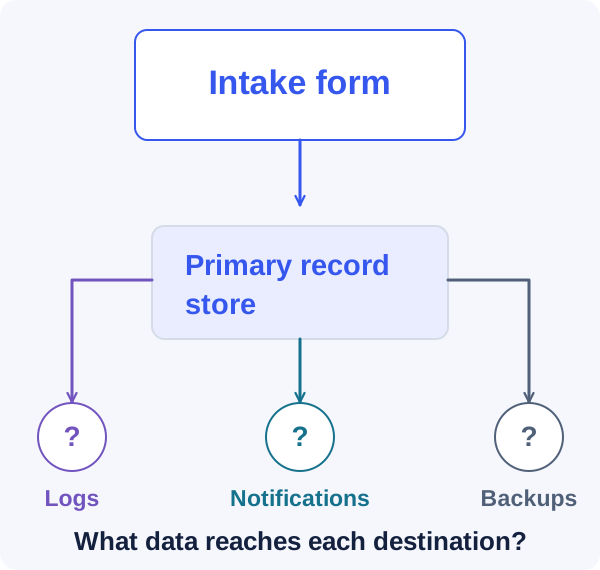
Pay attention to secondary systems. Analytics, error monitoring, support tickets, email notifications, and document previews can receive sensitive information without being recognized as part of the main data flow. Review default SDK behavior and avoid sending complete forms or page contents into general-purpose tools.
Minimize data where the workflow permits it. A reminder may not need the details of an appointment in its notification text. A support engineer may need a technical event identifier rather than a patient’s submitted answers. Reducing unnecessary exposure makes both the product and its operations easier to reason about.
Use synthetic or appropriately prepared data in development and testing. Do not copy production records into a developer laptop or demonstration environment simply because it is convenient. Define a controlled process for any exceptional use of real information and document who authorizes it.
The main database is only one destination
Design access around actual responsibilities
Create an access matrix for patients, caregivers where applicable, clinical staff, administrative staff, organization administrators, and technical support. Specify which records each role can view, change, export, or share. Avoid a single broad staff role if responsibilities differ materially.
Include organizational and contextual boundaries. A professional working across locations may need access to some records but not every record in every location. Temporary coverage, transfers, and revoked employment should have explicit workflows rather than requiring manual database changes.
Enforce access on the server for every relevant operation, including attachments and exports. Interface visibility is not an access control. Test resource identifiers from another patient or organization, and check that background processing does not bypass the same boundaries.
Plan account recovery and exceptional access with the responsible stakeholders. These processes need evidence, approval, and auditing appropriate to their impact. A carefully designed login flow can be undermined by an informal support process that grants access after an insufficient identity check.
Evaluate vendors as part of the complete system
Evaluate each vendor against the information it actually receives or maintains, including optional features and subprocessors. A business associate agreement (BAA) and a suitable service configuration need to cover the intended arrangement; a general claim that the vendor supports healthcare customers does not establish the scope of your use.
HHS cloud guidance makes an important distinction: a cloud provider maintaining ePHI for a covered entity or business associate can be a business associate even when the data is encrypted and the provider has no decryption key. Encryption alone does not remove the relationship or replace the other safeguards.
Use the illustrative intake-portal worksheet below as an engineering discussion aid. Have the accountable legal and compliance stakeholders confirm applicability and contractual obligations. Name the owner of each configuration and its evidence. Repeat the review when a new feature or vendor changes the information flow, and document how records will be retrieved or handled when the relationship ends.
| System | Data-flow decision | Evidence to review |
|---|---|---|
| Portal hosting and database | Store intake answers and identifiers only in the approved arrangement. | Applicable BAA scope, access responsibilities, configurations and recovery evidence. |
| Document storage and backups | Include attachments and retained copies in the ePHI inventory. | Covered services, key and access ownership, restore rehearsal and retention decisions. |
| Notifications | Prefer a minimal message directing the patient to the portal. | Approved message content; review the provider arrangement if information in scope is sent. |
| Error monitoring and analytics | Exclude patient answers and sensitive page contents from general telemetry. | Inspect actual SDK payloads, redaction and destination scope using synthetic data. |
| Support and document processing | Limit access and review any additional processing path before enabling it. | Authorized support workflow, vendor/subprocessor scope and a recorded approval decision. |
Planning a healthcare product?
Share the intended workflow and requirements identified by your accountable compliance team. We can help map the engineering scope.
Preserve meaning across integrations
Healthcare integrations can fail through semantic mismatches even when the network connection works. Confirm how identifiers, dates, units, statuses, and code systems are represented. A field called complete may mean submitted in one system and reviewed in another.
Define the source of truth for each record and how updates are reconciled. Avoid two systems silently overwriting each other. Record provenance so staff can understand where information came from and when it was last updated. If imported data is incomplete, display that limitation clearly.
Design retry and duplicate handling. An integration may deliver the same event more than once or provide updates out of sequence. Use stable identifiers and version information where available, and make reconciliation observable rather than hiding it inside a background process.
Test with representative cases approved for the purpose, including missing fields, corrected records, canceled appointments, and merged identities where relevant. Involve workflow experts in reviewing results. A technically valid payload can still be unsuitable for the way the receiving team uses the information.
Make forms and communication understandable
Use plain language, meaningful grouping, and clear explanations of why information is requested. Patients may be tired, anxious, using assistive technology, or working on a small screen. A form that assumes perfect attention and technical confidence will create avoidable errors.
Preserve progress where appropriate and explain whether information has been saved. Distinguish a draft from a submitted record. If a submission fails, identify what the user can safely retry and whether the care team has received anything.
Design corrections and follow-up questions deliberately. Staff should be able to request clarification without creating duplicate records or losing the history of what was originally submitted. The interface should make the current status understandable to both sides.
Review notifications for privacy and usefulness. A notification should guide the person to the next step without exposing unnecessary information on a lock screen or shared inbox. Let responsible stakeholders decide the appropriate content and channel for the workflow rather than copying a generic consumer-app notification pattern.
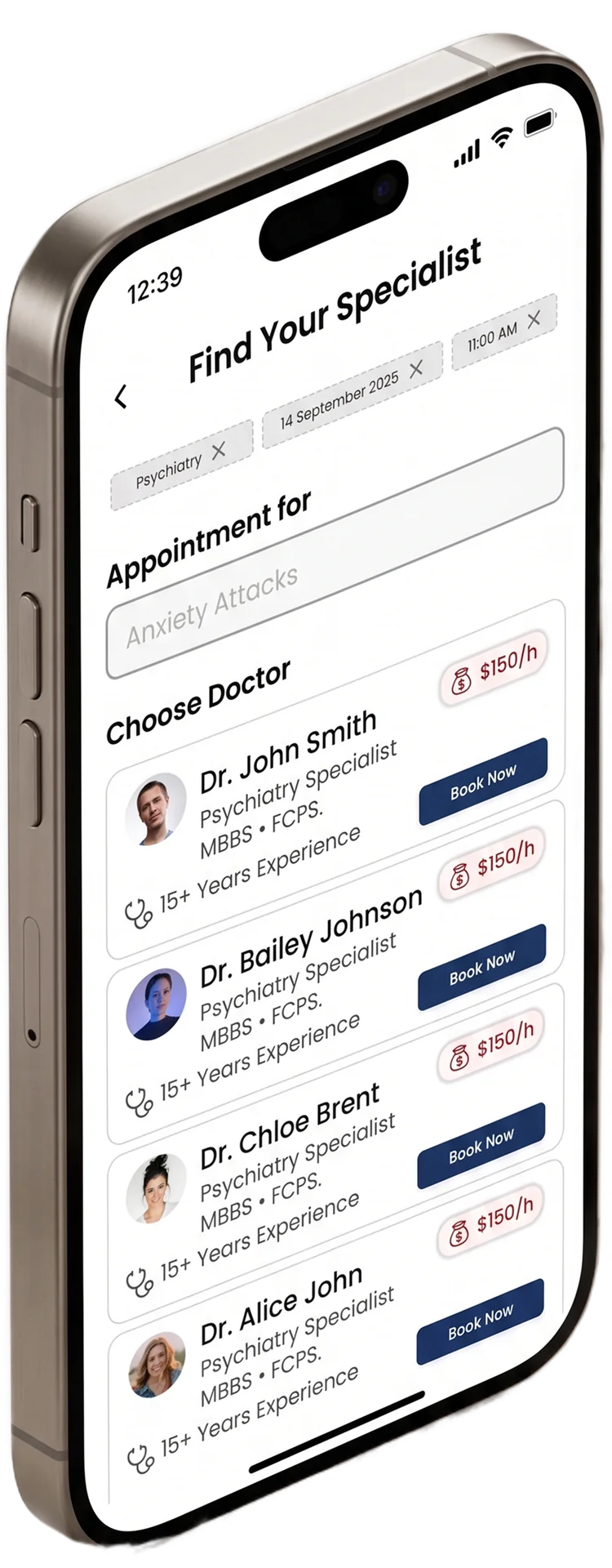
Make the appointment choices visible
Plan availability, recovery, and downtime behavior
Identify which workflows can pause and which require an alternative process when the application is unavailable. Define expected recovery and data-loss tolerances with the organization, then design backups and operational procedures around those expectations.
Test restoration in a controlled environment. Confirm that recovered data is usable, access rules remain correct, and integrations can resume without duplicating or overwriting records. A successful backup job does not by itself prove that the service can be restored as needed.
Provide clear failure states. Users should know whether a record was saved, whether an appointment action completed, and what alternative process to follow. Avoid a generic error that leaves staff unsure whether they should repeat a consequential action.
Assign operational ownership and escalation paths. The application team, hosting provider, integration vendor, and healthcare organization may each control part of recovery. Rehearse a realistic outage scenario so those responsibilities are understood before an incident creates time pressure.
Build evidence into verification and change management
Connect each requirement identified by accountable stakeholders to an owner and verification record. A policy statement is not evidence that the deployed flow follows it. For the illustrative intake portal, assemble the following engineering artifacts alongside the organization's wider compliance review.
Review changes according to their effect on the information and workflow. An export, analytics SDK or document-processing option can introduce a new data path even when its interface is small. Re-run the relevant evidence checks and record remaining issues before release.
- A versioned ePHI inventory that includes primary records, logs, notifications, attachments and backups, with owners for retention decisions.
- Approved access rules and tests for patient, staff, support, revoked membership and cross-organization requests, including exports and downloads.
- The applicable vendor agreements and the exact services and features evaluated, with configuration responsibilities assigned.
- Synthetic-data checks of telemetry and notifications showing which information leaves the portal and where it goes.
- A restore rehearsal and downtime workflow checked with the care organization; record what was recovered and what remains unresolved.
- A release decision that records the required professional reviews and open issues, rather than treating a successful technical build as compliance evidence.
Start with a bounded release and a durable operating model
Choose an initial workflow narrow enough to verify thoroughly. For the intake example, one organization and one reviewed form process may provide better learning than several partially integrated clinical workflows. Define who participates, how support works, and which limitations are communicated.
Review actual use with the responsible staff and privacy-aware operational data. Look for duplicate entry, unclear status, unnecessary access requests, and manual workarounds. These observations can improve both the software and the process around it.
Keep a maintenance plan for dependencies, access reviews, vendor changes, incident preparation, and updated requirements. Healthcare software does not become finished when the first version passes review. The durable outcome is an application and an organization that can continue operating it responsibly as workflows, personnel, and external systems change.
Frequently asked questions
Does HIPAA apply to every health or wellness app?
Not automatically. Applicability depends on the organization’s role, relationships, information, and activities. Other requirements may apply even when HIPAA does not. Have qualified legal and compliance stakeholders assess the specific product rather than inferring its obligations from the presence of health-related fields.
Can choosing a cloud provider make an app HIPAA compliant?
No. The relevant vendor arrangements and capabilities are only part of the system. The organization still needs appropriate policies, configuration, access controls, risk management, and operations. Review the specific services, contractual scope, and division of responsibilities with the people accountable for compliance.
Should healthcare software use real patient data during development?
Prefer synthetic or appropriately prepared test data that represents the workflow without unnecessary exposure. Any exceptional use of real information should follow an authorized, controlled process with suitable access and handling rules. Convenience or realism alone is not sufficient justification for copying production records into development environments.
What should a discovery engagement produce?
A documented intended use, workflow map, data inventory, access model, integration assumptions, applicable requirements identified by qualified stakeholders, and a prioritized risk register. It should also identify the evidence needed before release. That foundation makes estimates and architecture decisions more credible.
Let’s work through your next step.
Tell us what you’re building, what you’ve tried, and where you need a hand. We’ll work with you to define a practical way forward.