

The choice between a progressive web app and a native mobile app begins with how people will discover, use, and return to the product. A PWA can provide an app-like experience through the web, while a native application is distributed and integrated through mobile operating-system environments. Neither approach automatically produces a better business outcome.
Consider an illustrative service for booking local classes. A first-time visitor arriving from a search result may benefit from opening a link immediately. A committed member using bookings, downloaded content, and device features every day may value a deeper mobile experience. The same business can reasonably need both a strong website and an app at different stages.
This guide helps teams evaluate distribution, device capabilities, offline work, accessibility, performance, and operating costs. Browser and platform support changes over time, so treat capability testing on your actual target devices as part of the decision rather than relying on a static comparison chart.
Key takeaways
- Start with audience behavior and required device capabilities, not the label attached to the application.
- Test installation, notifications, offline work, and background behavior on the actual target browsers and devices.
- A PWA still needs deliberate caching, updates, accessibility, and recovery design.
- A native app still needs a useful web entry point and sustainable release operations.
Map the journey before selecting the platform
Describe where a user first encounters the product and what they need to do immediately. A person following a shared booking link may want to inspect availability before creating an account. Requiring an installation at that point can add friction. A person scanning equipment in a warehouse may have a managed device and a very different onboarding process.
Separate first use from repeated use. The best entry experience may not be the best experience for a daily power user. Identify which tasks happen occasionally, which happen frequently, and which rely on a device being ready at a particular moment.
Record environmental constraints. Users may have older phones, restricted storage, unreliable connections, shared devices, or employer-controlled installation policies. These conditions affect both web and native approaches and should be tested with representative users.
Choose success criteria around the journey: time to complete a first booking, reliability of a saved draft, or ease of returning to an active task. A platform decision is stronger when it is tied to these outcomes instead of a general belief that one delivery model is more modern.
Understand what a PWA does and does not provide
A progressive web app is built using web technologies and can add capabilities such as installation and offline behavior where supported. Google’s web.dev PWA learning material describes these capabilities and the need to account for different browser environments. Support and installation experiences are not identical across devices.
A PWA is not automatically a cached copy of a website, nor does adding a manifest make a product reliable offline. The team must decide what content is available, how updates are delivered, and what users see when a network request cannot complete.
The web distribution model can make sharing and discovery straightforward because a task can be represented by a URL. That advantage depends on good routing, metadata, and page behavior. A poorly structured single-page application can still make linking, loading, and search visibility unnecessarily difficult.
Evaluate the actual capability requirements rather than a checklist of possible browser APIs. A feature existing in one browser does not mean it is usable for your entire audience. Provide fallbacks where they preserve the task, and be explicit when a required capability makes a different platform necessary.
web.dev: learn progressive web apps
Specify offline saves, synchronization and measurement conflicts
Identify device features that can decide the question
List requirements such as camera access, Bluetooth, location, notifications, background work, media playback, and integration with platform services. Mark which are essential and which are optional. Then test the complete workflow on the supported devices, including permission prompts and behavior after the app is backgrounded.
A short demonstration is not enough for a capability the business depends on. For a field application, test what happens after the screen locks, the network changes, or the operating system suspends the process. For a media product, test interruptions from calls and other audio sources.
Native development can provide closer access to platform capabilities, but it still operates within system restrictions and user permissions. Avoid assuming that a native app can run indefinitely in the background or bypass a denied permission. Design the product around documented platform behavior.
If a capability is uncertain, build a small proof before investing in the full interface. Record the tested device and software versions and keep a fallback plan. The cost of that experiment is usually easier to manage than discovering a platform limitation after most screens are complete.
Design offline behavior around the task
Decide what offline actually means for the product. Reading previously opened content, editing a draft, collecting field data, and confirming a live booking require different levels of support. A generic offline badge does not explain which actions are safe.
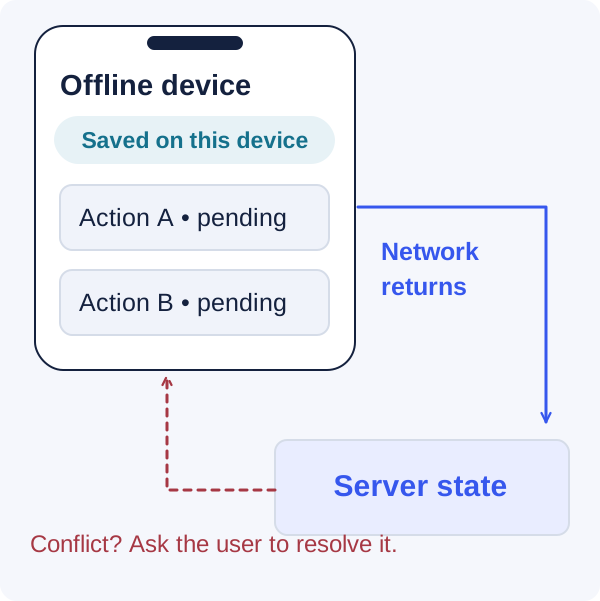
For a booking service, users might browse cached class descriptions while final availability requires a server response. For a reporting app, a completed form might be saved locally and queued for upload. Show whether the record is only on the device, waiting to sync, or confirmed by the server.
Plan storage limits, sign-out behavior, and device sharing. Private data should not remain accessible to the next person using a shared device. Users should understand what happens to unsent work when they log out, clear browser data, or uninstall an application.
Resolve conflicts deliberately. If a record changes elsewhere while a local edit is waiting, the system needs a merge rule, an authoritative version, or a review flow. Both PWAs and native apps require this data design; choosing a platform does not solve synchronization automatically.
Offline is a data state, not just a cached screen
Treat updates as an operational workflow
Web applications can deliver new versions without a store submission, but open tabs, cached assets, and service workers can keep older code active. Define how the application detects an update, whether it can apply safely during a task, and how old clients remain compatible with the server.
Avoid forcing a reload that discards a form or interrupts a payment. Provide a clear update prompt when necessary and preserve recoverable work. Test mixed-version behavior, because an updated server may receive requests from clients that have not yet refreshed.
Native releases have their own distribution and adoption process. Users may postpone updates, and staged rollout can leave several versions in use. Plan backward-compatible APIs, version-aware diagnostics, and a policy for versions that can no longer be supported safely.
For either approach, rehearse rollback and recovery. Reverting a frontend build does not automatically reverse a database migration or an external action. Keep release changes small enough to understand and ensure the operational team knows which version is affected when a customer reports a problem.
Deciding between a web experience and an app?
Bring the user journey and device requirements. We can help test the assumptions behind your choice.
Compare performance using the actual user journey
Measure the first useful screen, the time to complete an action, scrolling, input responsiveness, and behavior on a poor connection. A native shell that opens quickly but waits a long time for data may not serve users better than a well-built web experience.
Use representative content and devices. Large images, long lists, media, and third-party scripts can dominate performance. Test a realistic account rather than an empty development profile. Include the slowest supported device class in the evaluation where that audience matters.
For the web, pay attention to initial payload, rendering, caching, and unnecessary JavaScript. For native applications, inspect startup work, memory use, main-thread activity, and the cost of bundled or downloaded resources. In both cases, separate network delays from client-side processing.
Set a performance budget tied to the product. A booking action should feel responsive and show clear progress; a large export may take longer if its status and recovery are understandable. Optimizing the experience requires knowing what the user is trying to accomplish, not only comparing isolated technical measurements.
Include accessibility and navigation in the decision
Test the core workflow with keyboard navigation, a screen reader, large text, and reduced motion where applicable. Web semantics and native accessibility APIs provide different implementation tools, but neither guarantees that the finished product is usable.
Pay attention to transitions between contexts. A user might move from a search result into the PWA, from an email into a native deep link, or from an app into a system browser for authentication. The back action, focus position, and return destination should remain understandable.
Make URLs and deep links meaningful. A shared link should open the intended content when possible and provide a sensible fallback when the app is not installed or the user lacks access. Do not send every link to a generic home screen and expect users to find the task again.
Test forms and error recovery, not just reading screens. The most damaging accessibility issues often appear when a user must correct a field, confirm an action, or continue after a session expires. Include those interactions in acceptance criteria from the prototype stage.
Model total ownership rather than launch cost alone
A PWA can let one web delivery effort serve a broad audience, but it still needs browser testing, responsive design, caching strategy, and operational support. A native application adds platform builds, signing, store processes, and device-specific maintenance. Cross-platform frameworks can reduce some duplication without eliminating those responsibilities.
Estimate the work over the period the business expects to operate the product. Include dependency upgrades, operating-system changes, browser behavior, analytics, support, and accessibility verification. An inexpensive first build can become expensive if the team cannot maintain its most important integrations.
Consider commercial dependencies separately from technical ones. Payment and distribution arrangements vary by product and platform and can change. Verify current terms directly for the business model you plan to use instead of relying on a generic rule quoted in a comparison article.
Account for the website even if the app is native. Marketing, discovery, account support, and shared links still need a coherent web experience. The choice is often about which tasks belong where, not whether the business will have any web presence at all.
Use a staged platform strategy when it reduces uncertainty
A business can start with a responsive web product, learn which workflows become frequent, and add a native app when device integration or repeat use justifies it. That is a valid strategy if the initial architecture preserves clear APIs and the web experience meets current customer needs.
The reverse can also make sense. A device-dependent product may need a native application first while providing a lightweight web portal for administration and sharing. The platform sequence should follow the core task rather than a universal recommendation.
Avoid rebuilding the same business rules separately in every client. Keep authoritative permissions, pricing, and workflow state on the server. Clients can provide immediate feedback, but they should not become competing definitions of the product.
Document the trigger for adding another platform. Examples include a demonstrated need for an unsupported device capability, a large base of repeat users asking for a better mobile workflow, or an operational requirement for managed distribution. A clear trigger prevents speculative expansion from consuming the team before the first product has found its audience.
Make the final decision with a small evidence set
Prepare a decision record containing the audience, essential capabilities, prototype results, operational costs, and known limitations. Include the alternatives considered and explain why the selected approach fits the current stage of the business. This is more useful than a weighted scorecard filled with guesses.
For the class-booking example, a PWA might win because discovery and quick booking dominate the first release. A native app might become worthwhile later for richer media and a frequent member experience. Neither conclusion needs to imply that the other technology is inadequate.
Revisit the decision when the product changes materially, not whenever a new framework announcement appears. Preserve the evidence from the initial choice so the next discussion starts from what was learned. Good platform decisions remain adaptable because they are grounded in customer tasks and clear engineering boundaries.
Frequently asked questions
Can a PWA work without an internet connection?
It can support selected offline tasks if the application deliberately caches data and implements local work and synchronization. The exact capabilities depend on the browser, device, and product design. Define which actions remain available and make their synchronization state visible. Offline reading and offline transaction completion are different requirements.
Does a native app automatically retain users better?
No. Retention depends on recurring value, usability, reliability, and how the product fits the user’s routine. Installation and notifications can support a return experience, but they cannot compensate for an unhelpful workflow. Measure actual repeat task completion rather than assuming a platform determines engagement.
Should we build both at the same time?
Only when the business has evidence and capacity for both. Supporting two client experiences increases testing, design, and release work. A staged approach can reduce uncertainty, provided the first platform serves the essential task and the backend contracts allow another client later.
How do we validate browser capability claims?
Consult current official documentation and test the required flow on the devices and browsers you plan to support. Include permissions, installation, backgrounding, storage, and recovery. Record versions and limitations. A feature shown in a browser demo is not sufficient evidence for a production workflow across your whole audience.
Let’s work through your next step.
Tell us what you’re building, what you’ve tried, and where you need a hand. We’ll work with you to define a practical way forward.