

React Native and Flutter can both support a serious mobile product. Choosing between them is less about declaring a universal winner and more about identifying which constraints will dominate your application: existing team skills, device integrations, interaction design, release operations, and the work required after launch.
Consider an illustrative membership app with bookings, media playback, push notifications, and subscription access. Most of its screens may be straightforward in either framework. The decision could instead turn on background audio, a particular payment flow, an accessibility requirement, or a native SDK supplied by a hardware vendor. Those details deserve investigation before the team commits to a framework.
This guide offers a practical evaluation process. It avoids benchmark claims that depend on carefully selected demos and focuses on the product you actually need to ship. Framework capabilities and package support change, so confirm the current documentation and test the specific versions you plan to use.
Key takeaways
- Evaluate the hardest device-dependent feature before comparing ordinary screens.
- Include accessibility, startup behavior, native dependencies, and release maintenance in the decision.
- Existing team expertise matters, but it should be tested against the actual product requirements.
- Use a small representative prototype and a written decision record instead of a generic framework scorecard.
Begin with a product capability map
List the capabilities the app needs and classify them by risk. Account screens and content lists are usually different kinds of work from Bluetooth communication, background location, camera processing, or offline conflict resolution. The framework decision should pay particular attention to requirements that cross the boundary between shared application code and the operating system.
For each capability, identify the expected user experience on iOS and Android. A feature may have the same business purpose but different permission flows, system dialogs, or background behavior. Shared code does not remove those platform differences, and a design that ignores them can become difficult to implement well.
Record which requirements are essential at launch and which remain hypotheses. Do not reject a framework because of a speculative feature that may never be built. Conversely, do not assume a crucial native integration is simple because a package with a matching name exists.
End with a short list of proof points: the media player survives expected interruptions, sign-in returns correctly from the system browser, and a booking remains understandable when the connection drops. These are better evaluation targets than recreating a generic to-do application.
Understand what each framework asks of the team
React Native uses React concepts to build native applications and supports JavaScript or TypeScript application development. Flutter uses Dart and its own widget-oriented framework. Those high-level differences influence hiring, code organization, debugging, and how a team carries knowledge from an existing web product into mobile work.
Familiarity is valuable when it reduces uncertainty, but it is not a substitute for mobile experience. A web developer still needs to understand app lifecycle events, permissions, platform navigation, store distribution, and device testing. A shared language does not make a phone behave like a desktop browser.
Evaluate the team that will maintain the application, not only the team available for the first sprint. Ask who can diagnose a native crash, update a dependency with breaking changes, and review platform-specific code. If those skills are missing, budget for them whichever framework you choose.
Use the official introductions to understand the supported development approach, then test the workflow locally. The important question is whether the team can build, inspect, debug, and release the application consistently in its own environment.
Match the rendering approach to the intended experience
A product with a highly customized visual identity has different needs from a utility that should closely follow familiar operating-system conventions. Review navigation, text input, scrolling, gestures, dialogs, and selection behavior. A screen can look correct in a screenshot while feeling unfamiliar or awkward during normal interaction.
Flutter’s architecture documentation explains its rendering and widget model. Use that information to identify where your design aligns with the framework and where platform-specific behavior needs deliberate implementation. Apply the same scrutiny to React Native components and any third-party interface library under consideration.
Prototype one dense, interactive screen rather than several static ones. Include a form, validation, a long list, keyboard appearance, and a modal or sheet. Test large text settings and a screen reader. These interactions reveal layout and semantics issues that a polished landing screen will not expose.
Do not confuse consistency with identical pixels on every device. A consistent product can preserve its brand and task flow while respecting platform expectations. Decide which differences are intentional so developers do not spend time fighting the operating system to satisfy an unnecessarily rigid mockup.
Audit native dependencies before committing
Create an inventory of SDKs and packages for authentication, analytics, notifications, payments, media, maps, and device features. For each, check maintenance activity, supported platform versions, licensing, documented limitations, and the availability of a fallback. A critical dependency deserves a real integration test, not just a package installation.
Inspect the underlying native SDK where one exists. A community wrapper may lag behind the vendor’s release or omit a feature the product requires. Determine whether your team can extend the wrapper or call native code directly if needed. Include that work in the decision rather than treating it as an unexpected exception later.
Check how dependencies interact. Two individually supported packages can require incompatible build settings or versions of the same native library. A minimal application that includes the intended stack is useful for finding these problems before substantial interface work begins.
Document an owner for dependency updates and security notices. Mobile applications remain installed on user devices for varying periods, so the operational plan must accommodate older clients and gradual adoption of new releases. Framework selection does not eliminate the need for backward-compatible server behavior.
Test performance with a representative workload
Choose performance scenarios based on the product’s actual pressure points. A content application may care about startup, image loading, and scrolling. A field application may care about database queries and synchronization. A media app may care about playback continuity and memory use during navigation.
Use release builds on representative physical devices. Development instrumentation, simulators, and powerful hardware can distort the experience. Record enough context to reproduce the result: device, operating-system version, build configuration, data volume, network conditions, and the interaction performed.
Measure the whole workflow rather than attributing every delay to the framework. Slow startup may involve authentication or configuration requests. Stuttering lists may involve oversized images or unnecessary rendering. A frozen screen may be waiting on a synchronous operation that should be redesigned.
Set product-specific acceptance criteria before comparing implementations. The aim is not to win a benchmark by a small margin; it is to establish whether the app feels dependable within the constraints of its audience. If both approaches meet the requirement, maintainability and delivery capability may reasonably decide the outcome.
Choosing a mobile framework?
We can help test the features that matter most before you commit the whole product to a framework.
Design offline behavior as a data problem
Offline support is not a switch provided by either framework. Decide which data can be read without a connection, which actions can be queued, and how users know whether their work has reached the server. A cached screen that permits an action without explaining synchronization state can create false confidence.
For a booking app, availability may need a fresh server decision even when the catalog is cached. For a field report, users may be able to save a draft locally and upload it later. These are different consistency requirements and should not share one vague offline policy.
Define conflict handling when a record changes on another device. Some updates can merge; others need user review or a server-side rule. Use stable operation identifiers so retries do not create duplicate actions. Consider what happens if the app is terminated during synchronization or the user signs out with unsent work.
Evaluate local storage and synchronization libraries against those requirements. The framework can make a user interface convenient to build, but the reliability of offline work depends on the data model, server contracts, and recovery behavior.
Include accessibility and localization in the prototype
Check the core task with a screen reader, large text, reduced motion, and a keyboard where the target device supports one. Labels, focus order, error announcements, and touch targets deserve attention from the beginning. Retrofitting semantics after a visual component library has spread across the product is harder.
Try longer translations and right-to-left layouts if they are relevant to the intended market. A button that fits an English label may not fit a translated phrase. Dates, numbers, names, and addresses also carry regional assumptions that are independent of framework choice.
Test the complete flow, including native permission prompts and external authentication screens. A custom screen may be accessible while the transition into an embedded web view or a third-party widget is confusing. Document these boundaries as part of the product experience.
Assign accessibility acceptance criteria to shared components and high-value journeys. A framework’s support for semantics is helpful, but the finished application depends on how the team uses that support. Keep manual checks alongside automated checks and involve representative users when feasible.
Compare release and maintenance work
Estimate the work required to produce signed builds, manage environments, run automated checks, distribute test versions, and submit updates. A framework that feels quick during local development may still require careful native configuration and release management. Make those steps repeatable before the first public launch.
Separate application configuration from secrets and document which values are included in client builds. Anything shipped to a device should be treated as inspectable. Sensitive operations and privileged credentials belong behind server-side controls, regardless of how the app is compiled.
Plan for operating-system changes, dependency upgrades, and store requirements. Avoid assuming that a completed app needs only content updates. Allocate recurring engineering time to keep builds reproducible and to verify important flows against supported devices.
Evaluate ownership during an incident. The team should be able to connect a crash or failed request to an application version, affected device class, and relevant server behavior. A decision that accounts for this maintenance work is more useful than an estimate based only on the number of shared screens.
Run a bounded comparison and make the decision
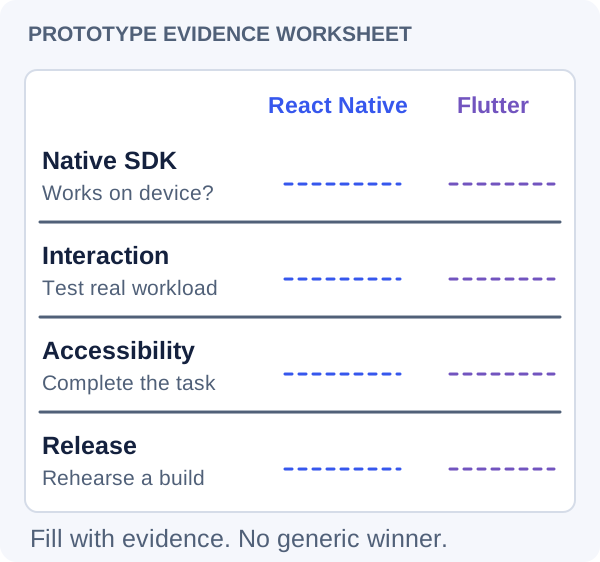
Build a small vertical slice containing the most uncertain requirements. Use the same user task, realistic data, and acceptance criteria for both options if a comparison is warranted. Do not spend weeks producing two complete apps merely to avoid making a decision.
Assess implementation complexity, dependency risk, accessibility, performance, debugging, and team confidence. Record observations separately from preferences. A developer’s familiarity with one language is a legitimate factor, but it should be described honestly rather than presented as evidence that the other framework cannot perform.
Include total ownership cost in the discussion. That means native expertise, release automation, upgrades, and support as well as initial development. A framework with slightly slower initial implementation may still fit the long-term team better, and the reverse can also be true.
Write a decision record with the selected approach, rejected alternatives, known limitations, and triggers for reevaluation. Once the decision is made, stop repeatedly reopening it without new evidence. Consistent engineering practices usually contribute more to the finished product than endless framework comparison.
Use the same hard feature in both prototypes
Keep the application portable where it matters
You do not need a universal abstraction around every framework API. Focus portability on business rules, API contracts, analytics definitions, and design decisions. These are valuable even if the interface technology never changes, because they reduce duplication and make behavior easier to test.
Keep server communication behind clear application boundaries and avoid spreading provider-specific assumptions throughout every screen. Separate calculations and validation rules from rendering when that improves clarity. Document platform-specific behavior explicitly rather than hiding it behind a misleading promise of complete sameness.
For the membership example, booking eligibility and subscription entitlements should have authoritative server rules. The mobile client can present those rules and provide helpful validation, but a later web interface should not need to reverse-engineer the app to understand the business. This separation protects the product’s core investment while allowing the mobile experience to take advantage of the framework chosen today.
Frequently asked questions
Is React Native automatically better for a React web team?
Existing React knowledge can shorten the learning curve, but the team still needs mobile skills and must validate native integrations. Test the most difficult device-dependent features before deciding. A familiar programming model is a strong practical advantage only when the complete product can be built and maintained reliably with it.
Does Flutter mean the app cannot feel native?
No. The experience depends on interaction design and implementation. Review platform conventions for navigation, text input, permissions, and accessibility, then test the result on real devices. A custom visual system can work well, but identical screenshots across platforms should not take priority over understandable and comfortable interactions.
Will one shared codebase remove all platform-specific work?
No. Signing, store distribution, permissions, native SDKs, device behavior, and some interface choices still need platform attention. Shared code can reduce duplication, but the amount varies with the product. Estimate the actual integrations and supported devices instead of assuming a fixed percentage of code reuse.
When is fully native development a better choice?
Consider it when the product depends heavily on platform-specific capabilities, unusually demanding performance, or a deeply platform-specific interface, and the team can maintain separate implementations. The choice should follow a prototype and ownership assessment. Cross-platform development remains a reasonable option when it meets the product’s requirements with a sustainable maintenance model.
Let’s work through your next step.
Tell us what you’re building, what you’ve tried, and where you need a hand. We’ll work with you to define a practical way forward.