

A design system is a shared way to make interface decisions and carry them into working software. It includes visual foundations, reusable components, interaction rules, documentation, and the ownership needed to keep those pieces aligned. A folder of buttons in a design tool is useful, but it is not the whole system.
Consider an illustrative product with a customer dashboard, an internal operations tool, and a mobile companion. Teams have created several versions of forms, alerts, and account navigation. Users encounter inconsistent behavior, and engineers repeatedly solve the same accessibility and layout problems. A design system can reduce that repeated work if it addresses the actual patterns used by the product.
This guide explains when a system is worthwhile, how to scope its first version, how design and code should connect, and how to measure adoption. The goal is consistency that helps teams deliver better experiences, not a library so rigid that every product decision requires a new exception.
Key takeaways
- Start with recurring product patterns and user problems rather than an exhaustive component inventory.
- Share behavior and accessibility alongside visual styling.
- Treat design files, code, documentation, and releases as one maintained product.
- Measure adoption, reduced rework, and user consistency instead of counting components.
Identify the cost of inconsistency
Audit a representative set of screens and workflows. Look for repeated patterns with different labels, spacing, validation behavior, loading states, or keyboard interactions. Record where those differences confuse users or create repeated implementation work.
Distinguish intentional variation from accidental drift. A destructive action should look different from a routine navigation link. A dense operations table may need a different layout from a public marketing page. The system should clarify those choices rather than force every context into the same visual template.
Ask designers and engineers where they repeatedly make the same decision. Forms, dialogs, filters, empty states, and status messages often provide more useful starting points than decorative components. Support feedback can reveal inconsistencies that internal teams have stopped noticing.
Use the findings to define the system’s purpose. For example, the first release may standardize account forms and common navigation across two products. That scope is easier to deliver and evaluate than a promise to create a complete universal interface language before any team can use it.
Create foundations that express meaning
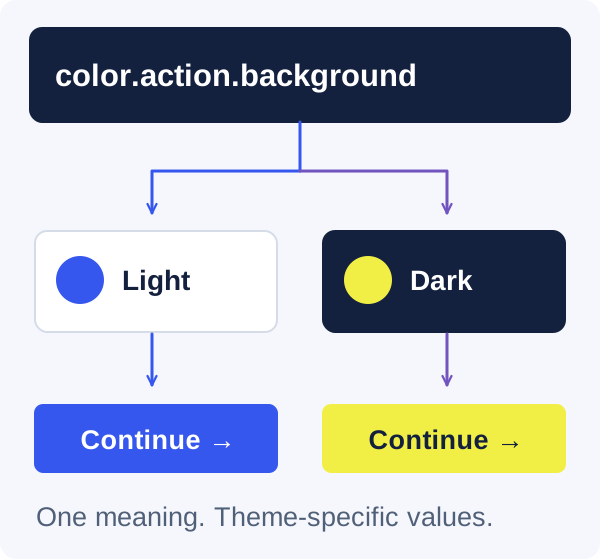
Define typography, spacing, color, borders, elevation, and motion in a way that reflects their purpose. Semantic tokens such as text-muted or surface-raised are easier to adapt across themes than components referring directly to arbitrary palette values.
Keep the token structure understandable. Too few tokens can force unrelated elements to change together; too many can make every decision feel unique. Begin with the distinctions the product actually uses and add detail when a recurring need appears.
Design light and dark themes together where both are supported. Check contrast, emphasis, borders, disabled states, and illustrations in each theme. Simply inverting colors can produce weak hierarchy or unreadable combinations. Components should consume semantic values so theme behavior is consistent.
Document when a token should be used, not only its value. A designer choosing a warning color and an engineer implementing an error state need the same meaning. Foundations become useful when they reduce ambiguity in real decisions rather than merely create a more organized palette.
A semantic token connects a decision to its uses
Choose components by frequency and consequence
Prioritize components that appear often or carry important behavior. Inputs, buttons, dialogs, navigation, tables, and status feedback are common candidates. A rarely used visual ornament may be easy to build but provide little return compared with a dependable form field.
For each component, list its states and interactions. A text field includes labels, help text, errors, disabled and read-only behavior, loading context, and possible character limits. A dialog includes focus entry, dismissal, focus return, scrolling, and behavior when content changes.
Separate primitive components from business-specific assemblies. A reusable select control belongs in the shared foundation, while a customer billing summary may belong to a product module. Sharing every business component can create dependencies that make independent product work harder.
Build components against real screens. An isolated example can miss long labels, dense layouts, or unusual data. Use a small set of representative product cases to verify that the component solves actual needs without accumulating dozens of speculative configuration options.
Make accessibility part of the component contract
Document keyboard behavior, accessible names, focus handling, and status communication alongside visual properties. These are not optional finishing details. A component that looks consistent but behaves differently for keyboard or screen-reader users is not a dependable shared foundation.
The W3C ARIA Authoring Practices Guide provides interaction patterns and examples for common widgets. Use it as a reference where custom widgets are necessary, while preferring native HTML controls when they meet the need. Adding ARIA attributes alone does not create correct interaction behavior.
Test components in context as well as isolation. A dialog may handle focus correctly on its own but fail when opened from a nested menu. A form field may have a label but lose its error relationship when assembled into a dynamic form.
Keep accessibility findings attached to component versions and fix them centrally where possible. Shared components create an opportunity for broad improvements, but they can also distribute the same defect across many screens. That makes careful verification especially valuable.
Align the design source and implementation source
Agree on component names, variants, states, and token meanings across design and code. The structures do not need to be identical, but a team should be able to map a design decision to its implementation without guessing which of several similarly named variants was intended.
Avoid maintaining two independent definitions of behavior. If an error state changes in code, update the design reference and documentation. If a new design variant is proposed, discuss its implementation and accessibility implications before it spreads across product mockups.
Use examples that show real content and edge cases. Include long names, empty results, validation errors, narrow layouts, and different themes. A library filled only with ideal content encourages teams to underestimate the work required for production screens.
Define a review workflow for changes to the system itself. Designers and engineers should both participate in consequential decisions. The purpose is not to create a slow approval committee; it is to keep the shared contract trustworthy enough that product teams can move quickly with it.
Bringing consistency to a growing product?
We can help identify recurring patterns and build a design system your team can implement and maintain.
Write documentation that answers implementation questions
A useful component page explains when to use it, when not to use it, the supported states, content guidance, accessibility behavior, and working examples. A screenshot and a property table rarely answer all the questions a developer or designer encounters.
Document composition patterns as well as individual parts. Teams need to know how to combine fields into a form, present an empty table, handle a destructive confirmation, and show progress for a long-running task. These patterns reduce inconsistency that cannot be solved by a button component alone.
Include migration guidance when behavior changes. Explain the old pattern, the new pattern, and any decisions a team must make during adoption. A release note that says improved API without an example forces every consumer to rediscover the same information.
Keep documentation close to the implementation process and give it an owner. Stale documentation is worse than a clearly limited reference because it creates false confidence. Review commonly used pages when support questions reveal that the intended behavior is not understood.
Provide a contribution path without losing coherence
Product teams will encounter needs the initial system does not cover. Give them a lightweight way to propose a pattern, explain the use case, and show an implementation. Require evidence of the need rather than a claim that every possible variation deserves a shared component.
Decide which changes belong centrally and which remain local. A repeated interaction used by several teams is a stronger candidate for the system than a one-off screen tied to a specific business process. Local experimentation can reveal a better pattern before it becomes a shared commitment.
Assign maintainers who can make decisions and communicate them. Shared ownership without decision authority can produce a backlog where no one knows whether a proposal is accepted. Central ownership without product input can create a library that does not meet real needs.
Make exceptions visible and review them periodically. An exception may be legitimate, or it may reveal a missing capability. The system should learn from product work rather than treating every deviation as a failure of discipline.
Version releases and migrate incrementally
Treat the component library as a dependency with a release process. Communicate changes, preserve compatibility where reasonable, and distinguish visual adjustments from behavior or API changes. Consumers need to understand the risk of an update before adopting it.
Use automated checks for important behavior and visual review for meaningful appearance changes. Test representative combinations of themes, sizes, and content. Avoid creating an enormous snapshot collection that produces noise without helping reviewers identify real regressions.
Migrate one workflow or product area at a time. Replacing every component across every application in one release can create a large and difficult-to-review change. Start where the system provides clear value and use the experience to improve documentation and migration tools.
Track old patterns and define a realistic retirement plan. A system that only adds new options without removing obsolete ones can become harder to use over time. Make deprecation a supported process rather than an abrupt demand that product teams stop other work immediately.
Measure adoption and the quality of outcomes
Component count is an activity measure, not evidence of success. Track whether teams use the system for new work, whether repeated defects decrease, and whether common changes can be made more consistently. Ask consumers where the system saves time and where it creates friction.
Look at user-facing outcomes too. Are validation messages more understandable? Does keyboard navigation behave consistently? Do settings and account actions use the same language across products? These improvements connect the system to the experience it is meant to support.
Interpret delivery metrics carefully. A new library may initially require migration effort before it reduces repeated work. Compare similar tasks and include the cost of maintaining the system itself. Avoid claiming a universal productivity increase without evidence.
Use findings to adjust scope. If teams repeatedly bypass a component, investigate the reason before enforcing adoption. The component may be too rigid, poorly documented, or unsuitable for an important context. A design system earns trust by solving those problems.
Keep the system proportionate to the organization
A small product team may need a compact set of tokens, reliable primitives, and a few documented patterns. A larger organization may need governance, multiple platforms, release tooling, and dedicated maintenance. Start with the level of structure the current team can sustain.
Protect room for product identity and experimentation. Shared foundations should make routine decisions easier so teams can spend attention on what is distinctive. They should not force every page into a generic arrangement or make a new interaction impossible to explore.
Review the system as a product with its own users, roadmap, and maintenance needs. Its success is visible when teams can build coherent, accessible interfaces with fewer repeated decisions and fewer surprises. The strongest system is not necessarily the largest; it is the one people can understand, trust, and use in the work they actually do.
Frequently asked questions
When does a company need a design system?
When repeated interface decisions, inconsistent behavior, and duplicated implementation work create enough cost to justify shared foundations. You do not need several large teams to benefit, but the scope should match the organization. A small, maintained system is better than an ambitious library no one has time to support.
Is a UI kit the same as a design system?
A UI kit is one useful part. A design system also covers behavior, accessibility, tokens, implementation, documentation, contribution, and ongoing ownership. Without those pieces, teams may copy the same appearance while implementing different interactions and maintenance patterns.
Should every component be shared?
No. Share stable patterns with recurring value. Keep specialized business assemblies local until there is evidence that several consumers need the same contract. Over-sharing can couple unrelated products and turn a component library into a large collection of exceptions.
How do we avoid slowing product teams down?
Provide useful defaults, clear examples, a fast contribution path, and a practical exception process. Migrate incrementally and measure where the system helps or hinders. Governance should protect consistency and reliability without requiring central approval for every routine product decision.
Let’s work through your next step.
Tell us what you’re building, what you’ve tried, and where you need a hand. We’ll work with you to define a practical way forward.