

Reddit creators are reporting complete motion graphics videos from a single human prompt to Claude Opus 5.5. The examples include a SaaS launch film whose creator says they made zero adjustments, a one-minute surreal short, and product showreels assembled through code. The trend is about getting an exported video back from an agent, rather than receiving a script to finish manually.
We checked the original Reddit posts and creator replies on September 30, 2026. Below are the reported examples, what one-shot means in an agent workflow, and an original prompt that asks for the complete production run. The creator accounts are self-reported; we have not reproduced their sessions. Our storyboard and production recommendations are illustrative.
Key takeaways
- Creators explicitly report finished videos from one human prompt, including a SaaS launch film with no manual adjustments.
- One-shot can include many autonomous tool calls, rendering steps and corrections inside the agent's run. It does not mean one model response with no tools.
- A clear message, approved assets and a timed storyboard matter more than asking the model to make something impressive.
- Keep scene timing, copy, colors and assets editable so a small revision does not require rebuilding the whole film.
- Review the moving export and listen to its audio. Attractive still frames cannot prove that the complete video works.
Why Opus 5.5 motion graphics are getting attention
Anthropic released Claude Opus 5.5 on September 22, 2026, with improvements aimed at coding and complex professional work. Soon afterward, creators began sharing films and motion graphics that they say the model designed, coded and rendered from a single request. The Reddit examples below make that one-shot claim explicitly.
The practical shift is the scope of the assignment. Instead of asking for animation code and taking over the rest of production, a creator can ask the agent to gather the supplied assets, choose a scene structure, build motion, produce audio where permitted, render the film and check the output. The agent carries those steps forward within the same run.
A one-shot result can still be editable. If the film is built through code, the creator can keep the source and later ask for a different duration, a new headline or a format variant. The first-pass capability and the ability to revise it are both useful parts of the workflow.
Reddit example: a SaaS launch video with zero adjustments
In r/buildinpublic, u/sarahandgerald posted a visualOS promotional film and described it as the result of one prompt and roughly 20 minutes of waiting. The creator supplied access to a repository and a press folder. In the replies, they state that they made zero adjustments and used Max effort.
The same creator explains that the agent found and used part of an existing screen recording alongside other product assets. Their posted log describes discovering screenshots, an app icon and logo files. This is especially relevant to founders: the brief can point the agent toward the real product material instead of requiring a person to assemble every scene by hand.
The useful lesson is to provide a rich source of approved context. A repository and organized press assets give the agent something concrete to inspect. One human prompt can be short because the assets carry much of the product and brand information. The reported 20-minute runtime belongs to that session, rather than a universal estimate.
Reddit: visualOS creator reports one prompt and zero adjustments
Reddit example: a one-minute film from one prompt
In r/ClaudeAI, u/AzorAhai1TK shared a surreal workplace film and posted the prompt they say produced it. The request asked for a one-minute video to be created programmatically, including visuals and audio, with the agent choosing the tools. The creator reports about 45 minutes including rendering at Extra-High effort and confirms using Claude Code.
In replies, the creator lists FFmpeg, NumPy, SciPy, Cairo and Piper TTS, attributing the technical breakdown to Claude's account of its work. That describes an agent-operated production pipeline, rather than a person having to open and operate each application themselves.
This example also broadens the story beyond a short logo sting. The reported task includes a theme, a visual mood and sound. The creator gives the agent creative latitude, while the agent handles the technical steps needed to produce the deliverable. Start with a shorter film when trying the workflow for your own brand so you can judge the result without committing to a long render.
Reddit: the original one-shot, one-minute video post and creator replies
What the follow-up comments reveal about one-shot claims
Another r/ClaudeAI post by u/Level_Knowledge5472 describes a music video about AI fear-mongering. The original body mentions a few rounds of feedback; a later creator reply says the full video came from the first prompt and a second request added the song. The creator also describes using Remotion and external media resources, including ElevenLabs for the music.
That makes the account useful, but the final music video should be described with its follow-up step intact. The first-pass visual film and the later song addition are distinct claims. Reading the original author's replies gives a more precise account than repeating the headline alone.
Across these examples, one-shot refers to the number of human instructions needed to obtain a result. It can involve a substantial run of asset inspection, code generation, rendering and internal corrections. An agent fixing a render within that run does not require a new human prompt. For your own experiment, ask for the complete export and let the agent carry the work through to that outcome.
Reddit: the music-video creator clarifies the first pass and song follow-up
How the code becomes a video
A detailed r/vibecoding example by u/oxmannnn describes a Grok Bot film built as a webpage, rendered frame by frame in headless Chrome, with music and sound effects synthesized in Python. The creator says the first cut was a 15-second film. The posted 30-second version followed feedback to slow the pacing and use flatter bot artwork. This particular published version is a revision, while its first cut still came from a one-line brief.
In this approach, a composition defines what appears at a particular moment: text positions, shapes, opacity, camera framing and asset placement. A renderer evaluates those instructions over time, exports frames and encodes a video. The agent can operate that renderer as part of the requested task, so the human can receive a finished file without manually running the pipeline.
For precise typography, diagrams, product interfaces and logo motion, code gives the agent direct control over layout and timing. A concept involving human performance or photographic action may also use supplied footage or generated media. The method depends on the brief and the resources the agent can access.
Keep the source alongside the export. A final MP4 is useful for distribution, while source files let you change a launch date, replace a screenshot or create a different aspect ratio later.
Reddit: the Grok Bot creator explains rendering, audio and the revised cut
Start with a brief that has a real message
A good one-shot brief names the viewer, the message and the finished deliverable while giving the agent room to solve the production details. For an illustrative scheduling product, the message could be that dispatchers can place an unassigned job with an available technician. The agent can choose the shot structure around that benefit.
Provide the real logo, product screenshots, approved font files and exact on-screen wording. Identify which assets must remain intact. If the product interface is still a concept, say that explicitly and keep any invented data visibly illustrative. A plausible dashboard should not quietly become a claim about a shipping feature.
Specify duration, aspect ratio, destination and whether the film must work without sound. To test the one-shot workflow, request the full rendered file in the same instruction. A request that asks only for a storyboard naturally ends earlier in the process. You can let the agent create its own storyboard, implement it, inspect frames and correct problems before returning the export.
The prompt below is an original template, inspired by the workflow rather than copied from a Reddit post. Replace its placeholders and use it in an agent environment with access to your assets and permitted rendering tools.
One prompt for a complete product motion graphics video
Use to test a complete first-pass film when the message, assets and tool access are ready.
Create and render a polished 15-second motion graphics video for [product], aimed at [viewer]. The single message is [specific benefit]. Carry the task through to a playable MP4 and editable source in this run; do not stop after a plan or code draft.

Use the actual product and brand assets in [repository/approved asset paths]. Preserve the logo geometry and screenshot content. Exact on-screen copy: [headlines and closing line]. Colors and fonts: [details]. Output: [aspect ratio], [resolution], [frame rate].

Choose the storyboard, visual hierarchy and motion direction yourself within that brief. Give important text a readable hold and the closing logo enough time to register. Use available, permitted rendering tools and licensed assets. Keep timings, copy and colors editable. [Audio direction and approved audio resources, or specify silent.]

Render representative frames, inspect them, correct visible problems and finish the full export. Check duration, missing assets, clipping and the final frame. Return the video, source and a concise account of the tools and any remaining limitations. Do not invent product features or performance claims.Have a product story that needs a clearer visual direction?
Bring your product screens, brand assets and audience. We can help shape the message and visual system for your launch.
Storyboard a 15-second feature reveal
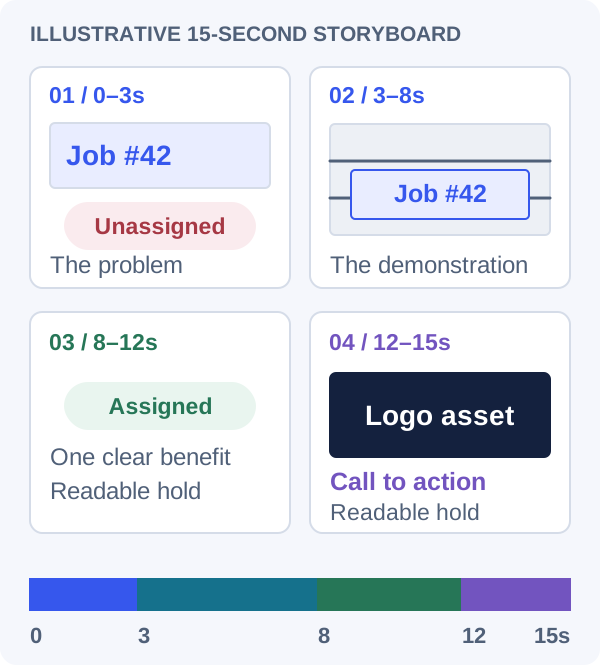
Here is a hypothetical four-beat structure for the scheduling example. The time ranges are planning choices, not a recipe for every product. Each beat has one job, and the last scene gets enough time for the viewer to recognize the brand and read the closing line.
The middle of the film should demonstrate the change that matters. Show the job moving into a technician's schedule using the approved interface. A rotating device or a cloud of particles may look energetic, but it earns its place only if it helps the viewer understand the feature.
Reserve a readable hold after an entrance. If a sentence takes most of the scene to assemble letter by letter, the viewer has little time to read it. Try the sequence at normal speed on a phone before adding more detail. Shorten the copy when the message cannot fit comfortably.
Think of the storyboard as a timing agreement. Once approved, changes such as an extra headline or a longer product demonstration should be reflected in that agreement rather than squeezed into the existing scenes.
| Time | Scene purpose | What the viewer sees |
|---|---|---|
| 0–3 seconds | Establish the problem | One unassigned job and a short headline. |
| 3–8 seconds | Demonstrate the feature | The job is assigned in an approved product screenshot. |
| 8–12 seconds | Make the benefit readable | A clear schedule state and one supporting line. |
| 12–15 seconds | Close with recognition | The intact logo and a readable call to action. |
Give every beat a clear job
Keep animation predictable and revisions local
For a frame-based renderer, define motion from the frame or composition time instead of the moment a browser callback happens to run. Remotion's fundamentals describe this approach using the current frame to determine animation state. It makes individual moments easier to inspect and reproduce when the rest of the rendering environment is fixed.
Organize each scene around named controls: start time, duration, headline, asset and motion parameters. A request to extend the final logo hold should change a small timing value. It should not require searching through many unrelated calculations. Keep shared typography and colors in a central place so variants remain consistent.
Be deliberate about randomness. If the composition uses particles or noise, keep the random sequence reproducible for a given version. Load fonts and media before rendering, and check whether a missing dependency causes a fallback. Otherwise the approved preview and final export may differ for reasons that have nothing to do with the creative direction.
Save working versions as you iterate. Record which source version produced the approved export, especially when several people are giving feedback. A filename such as final-final does little to explain what changed.
Give feedback in terms of visible moments
Useful feedback identifies a moment and a correction: the feature label becomes readable too late, the logo crops during the scale-up, or the transition competes with the demonstration. Ask for one change at a time when you are still establishing the visual direction.
Separate message changes from motion changes. If the benefit is unclear, rewriting the headline may help more than increasing the animation speed. If the message is strong but the film feels rushed, extend the hold and simplify the transition. This makes iteration easier to assess because you know what each revision is meant to solve.
Use timecodes when reviewing the exported preview. A comment about the 7-second mark is more actionable than a request to make the middle better. Preserve approved sections and ask the assistant to report which controls changed. That keeps a small revision from silently altering the whole composition.
Request a precise timing revision
Use after reviewing a complete preview at normal speed.
In the preview, [text/asset] at [timecode] is [specific problem]. Change [timing, position or motion] so [observable result]. Preserve the approved copy, assets and other scenes.

Render the affected scene plus the complete film. List the source controls changed and verify that the total duration, scene boundaries and final readable hold still match the brief.
Review sound and the actual export
A contact sheet can reveal clipped text and inconsistent spacing, but it cannot show whether a movement feels abrupt or whether sound lands at the wrong time. Watch the complete encoded file. Listen on ordinary headphones and a phone speaker, and check a silent playback too if the destination commonly mutes video.
Check the beginning, every transition and the final frame. Confirm that the exported duration and aspect ratio match the brief, the logo stays intact and important wording remains readable. Play the file in the destination or its preview flow when possible; the composition window is only one viewing environment.
Use audio you have permission to publish and retain its license record with the project. If sound was generated or synthesized, listen for clicks, abrupt endings and distracting volume changes. Measurement can help find peaks or silence, but a person still needs to judge how it sounds.
For accessibility and reuse, keep a plain-language description of the video's message and retain caption or transcript material where speech is involved. A flashy animation should still communicate its core point when someone cannot follow every visual detail.
Decide whether the workflow fits your team
Try one bounded deliverable before changing your production process. Track the time spent on the brief, source generation, review, rendering and revisions. Include the cost of preparing screenshots and getting copy approved. The first render is only part of the work.
A useful pilot produces both a publishable asset and a project someone else can open. Ask a teammate to change one headline and render a new version. If that simple handoff is difficult, improve the project structure before scaling to a library of videos.
The lasting opportunity is editable production: a team can reuse a clear visual system and request targeted variations. Whether Opus 5.5 belongs in your workflow depends on the quality of the finished piece, the effort required to revise it and the ability to maintain the source after the initial experiment.
Frequently asked questions
Can Opus 5.5 make a complete motion graphics video from one prompt?
Creators in the linked Reddit threads explicitly report that result, including a SaaS promotional video with zero adjustments. In an agent environment, the single request can trigger asset inspection, coding, rendering and internal corrections before the finished file is returned. We have not reproduced those individual sessions.
Does one-shot mean no rendering tools or internal retries?
One-shot describes one human instruction. The agent can make many tool calls and correct its own code within that run. The linked examples use production tools, and some published versions add a later revision or song; those follow-ups are described above.
What should I keep after approving the MP4?
Keep the source, assets, font and media license records, rendering instructions and the version that produced the approved export. These make later copy changes and format variants easier to manage.
Let’s work through your next step.
Tell us what you’re building, what you’ve tried, and where you need a hand. We’ll work with you to define a practical way forward.