Fitness & subscription coaching / CASE STUDY
Coach Phil: his coaching, his own app.
A fitness instructor’s subscription platform, connecting client goals, workouts and meal plans with the admin tools to run his coaching business.
 THE PRODUCT IN FOCUS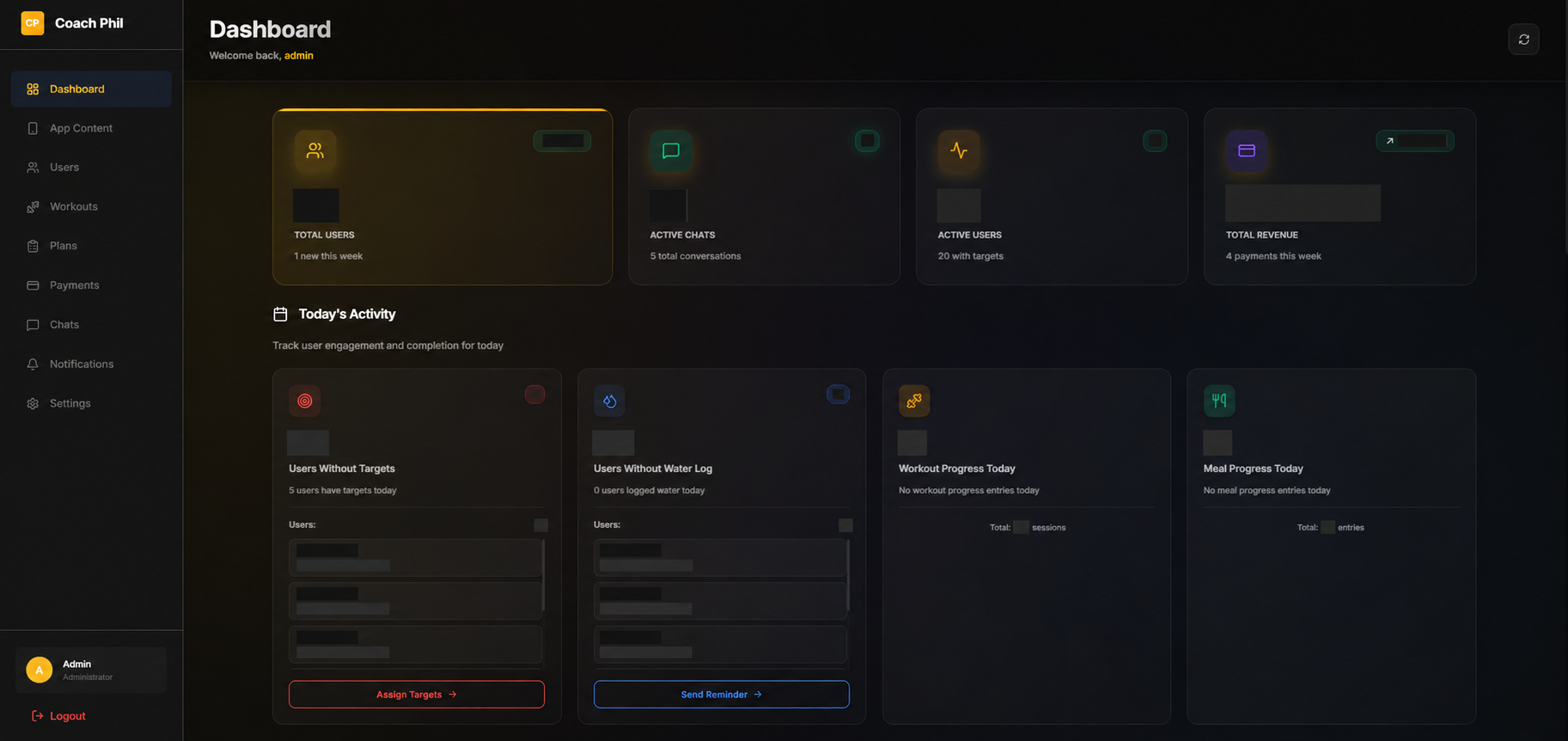
- BUILT FOR
- A fitness coach, his community & paying clients
- OUR ROLE
- Mobile development · Admin panel · Subscription integration · Client & content management
- THE PRODUCT
- iOS, Android & web admin panel
01 /THE BRIEF
An audience knew the coach. The next step was a product.
Coach Phil came to MUBBITS with a clear ambition: turn his work as a fitness instructor and influencer into a personal coaching app. He wanted clients to subscribe to his service and receive fitness goals, meal plans and exercise programs in one place. The product needed to carry his identity while supporting the day-to-day relationship between a coach and the people following his guidance.
That brief had two equally important audiences. A subscriber needed to understand what to do today, find the right workout or meal, and follow progress against their goals. Phil needed a way to prepare that experience, manage clients, assign plans and keep the service running. A polished mobile app would only solve half the problem if routine coaching work still depended on a developer changing content behind the scenes.
MUBBITS built the client-facing mobile application and the web admin panel behind it. The two experiences connect around clients, content, daily targets and subscriptions. The result is a branded fitness platform that brings the coach’s service into an ongoing digital relationship: people can access their program on their phones, while the coach manages the operation through a dedicated workspace.
02 /INSIDE THE EXPERIENCE
The decisions behind the screens.
Original project visuals, with the journeys and thinking that connect them.
View full size01 / THE CLIENT’S DAY
Give every visit a useful starting point.
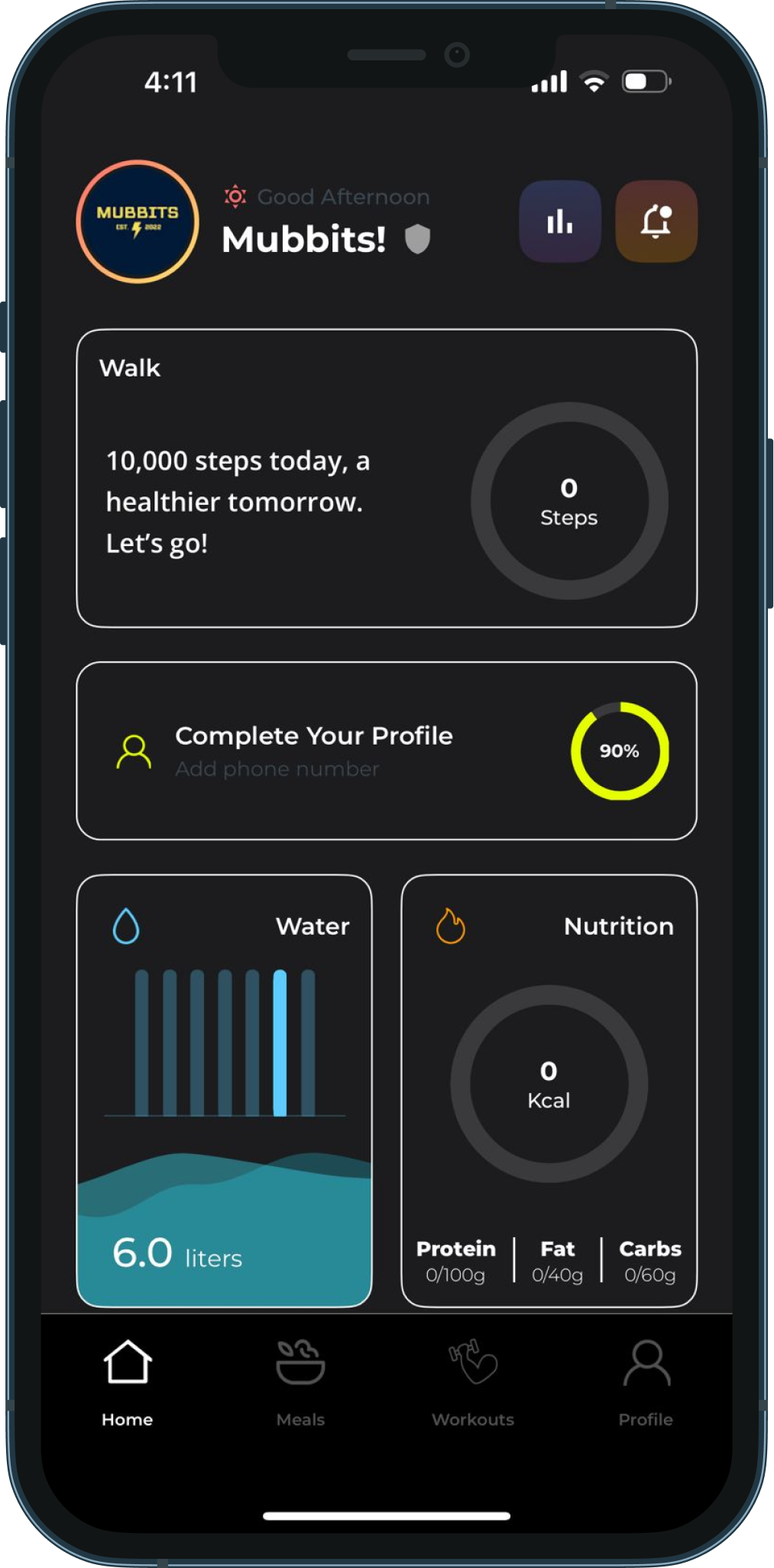
A coaching subscription becomes useful through repeated, practical interactions. When a client opens the app, the first question is usually about today: which targets need attention, what training is planned and how the day is going. The home experience brings activity, hydration and nutrition into a shared starting point, with clear routes to meals, workouts and the client’s profile.
Progress components make different kinds of information easier to scan. A hydration view communicates water logged, while nutrition shows calories and the breakdown of protein, fats and carbohydrates. These are separate measures, so the interface gives each its own space rather than compressing everything into a single score. The client can move from the summary into the relevant part of their plan.
Personalization also needs structure behind the screen. Daily targets connect a client to dates, nutritional targets, assigned meals and workout plans. This gives the coach a way to prepare guidance for a particular person and period. The mobile experience then presents those assignments in the context where they matter, instead of expecting the client to assemble a plan from a general content library.
Keeping the main navigation consistent supports that daily rhythm. Home is the overview, meals and workouts are the places to act, and the profile holds account-related information. The aim is a recognizable routine that clients can return to as their program develops.
 View full size
02 / TRAINING WITH CONTEXT
Turn a workout plan into the next clear action.
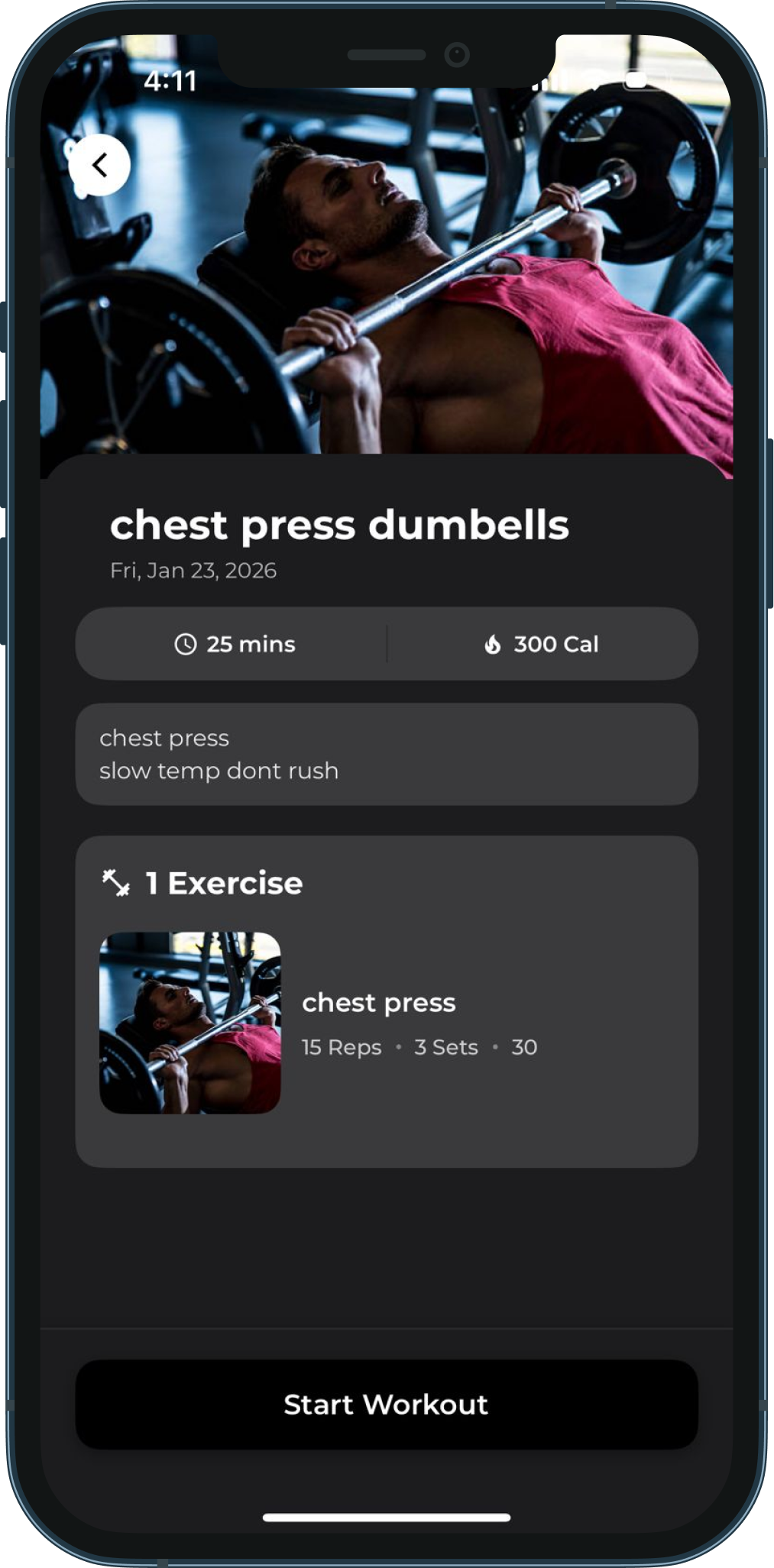
An exercise library and a coaching program do different jobs. The library holds the individual movements; the program gives them order and purpose for a client. Coach Phil connects these layers through workout plans, exercise details and assignments. A date-based view helps clients find the session attached to the day they are reviewing.
Inside a session, the interface presents the workout description and the exercises it contains. Details such as sets and repetitions sit alongside the movement, while video playback supports demonstrations. This keeps the instructions close to the action: a client can move from the planned session to the guidance they need to follow it.
The administration model supports reusable workout content and per-client adjustments. An exercise does not need to be recreated every time a coach changes someone’s sets or repetitions. Separating the underlying content from its assignment makes it possible to retain a consistent library while tailoring the program to the person receiving it.
This is a useful distinction for a personal training business. The coach remains responsible for the program and its progression; the software organizes delivery, access and recorded activity. For the subscriber, the experience stays focused on understanding the session and following the sequence rather than navigating the administrative structure behind it.
View full size03 / MEALS & DAILY TARGETS
Put the nutrition plan beside the training plan.
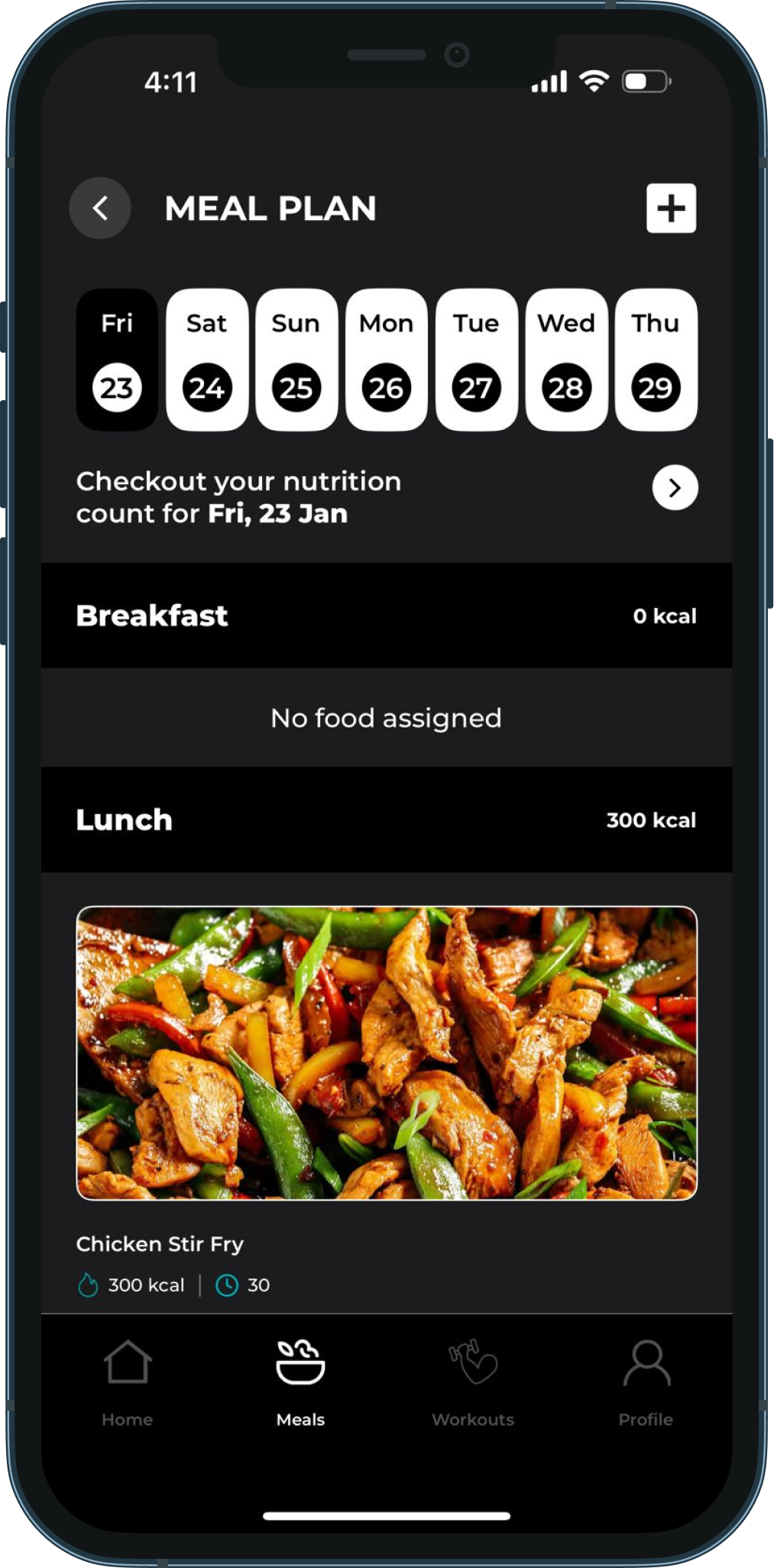
The subscription offering includes nutrition as well as exercise. Meal planning therefore belongs in the same product journey, with a clear relationship to the client’s daily targets. The app organizes meals by date and mealtime, allowing a person to review what has been assigned for breakfast, lunch or another part of the day.
Meal content carries more than an image and a title. The administration tools support ingredients, preparation method, cooking time, serving information and nutritional values. Bringing these details together gives the coach a reusable content base and gives clients the context they need when opening an assigned meal.
A client’s plan links those meal records to particular dates and mealtimes. Nutritional targets can include calories, protein, carbohydrates and fats. Keeping the content and the assignment separate matters here too: a meal can remain part of the library while its place in an individual client’s schedule changes.
The wider product includes meal progress and nutrition logging, connecting the planned day with what the client records. This gives both sides a more useful point of reference for a coaching conversation. Training, meals and daily goals can be discussed together because the product holds their context in one connected service.
View full size04 / THE COACH’S WORKSPACE
The business needs a working side of the app, too.
Phil needed to manage the service after launch, so the admin panel was a core part of the build. Its navigation brings app content, users, workouts, plans, payments, chats and notifications into one workspace. The dashboard provides an overview of activity and routes into the areas that need attention.
Client management connects the operational overview to individual coaching work. The coach can manage daily targets and assign meals and workout plans to a user. Workout and meal libraries support the content side of that process, while the client record provides the context for deciding what belongs in someone’s program.
The dashboard also surfaces gaps such as clients without targets or without a water log. These views lead to actions such as assigning targets or sending reminders. That relationship between a signal and a next step is more useful than a dashboard that only displays totals: it helps the coach move from reviewing the service to doing the work.
Chats and notifications support communication alongside the plans. Payment records provide visibility into the commercial side, and app-content management gives the coach control over the material clients encounter. Together, these tools make the admin panel the operating workspace for the subscription service. Client identities and selected figures have been masked in the dashboard visual shown here.
03 /DESIGN MEETS ENGINEERING
The thinking beneath the interface.
Two interfaces, a connected service
The mobile application uses React Native, while the web admin panel uses React and TypeScript. Firebase services support shared application data and account workflows. The important relationship is between what the coach prepares and what a subscriber receives: users, workout content, meal records and dated assignments need consistent identifiers and meaning across both interfaces. Designing those relationships makes the dashboard and mobile app parts of the same product.
Subscriptions belong in the product journey
A paid coaching app needs to connect membership access with the client’s account. The mobile project integrates RevenueCat for subscription offerings, purchase handling and entitlement information, with a purchase-restoration flow in the profile. That work sits alongside the training and nutrition experience, so access is treated as an ongoing account state. The admin panel’s payment views support the coach’s operational visibility into the service.
Reusable content, personal assignments
Workout plans group exercises; meal records hold preparation and nutritional information; daily targets associate a user with dates and assigned content. The model also supports client-specific set and repetition overrides. These distinctions allow the content library to serve several clients without making every program identical. Progress, hydration and communication workflows add the feedback needed to support the relationship after a plan has been assigned.
04 /THE OUTCOME
A personal brand became a subscription product.
Coach Phil now has a mobile application with App Store and Google Play listings, supported by the admin panel MUBBITS built for managing the service. Subscribers have a dedicated place for their training, meals and goals, and the coach has the corresponding tools to organize content, clients and everyday operations.
The delivered scope connects the visible product with the business behind it. A workout screen is linked to the content the coach manages. A meal plan is linked to its date and client assignment. Subscription access is linked to the account journey. These connections turn a set of fitness screens into a service that can be maintained and developed over time.
For another coach or creator considering a personal app, the starting point is the same practical question: what will a subscriber receive, and how will your team deliver it? The answer shapes both the mobile experience and the management tools. Coach Phil shows how product design and engineering can carry an existing coaching offering into a branded subscription platform.
05 /BEFORE YOUR NEXT BUILD
A little more detail.
Questions about the project and planning something similar.
What did MUBBITS build for Coach Phil?
MUBBITS built the client-facing mobile app and the web admin panel. The app brings fitness goals, assigned workouts, meals and progress workflows into a branded subscription experience. The admin panel supports managing users, content, workout and meal plans, targets, payment records, chats and notifications. The case study covers both sides because the subscriber experience depends on the coach’s ability to run the service.
How does the subscription fitness app work?
Clients subscribe to the coaching service and use the mobile app to access the relevant training and nutrition experience. The project includes subscription offerings, purchases, entitlement handling and restoration through RevenueCat. Membership pricing and available plans should be checked through Coach Phil’s current channels, as they can change independently of this case study.
Can the coach manage plans without changing the app’s code?
Yes. The admin panel provides the working interface for managing content and client assignments. The coach can work with workout and meal records, daily targets and dated plans through the dashboard. Reusable content is separated from individual assignments, including support for client-specific exercise sets and repetitions. Routine content management is part of the product’s administration workflow.
Is Coach Phil available on iPhone and Android?
Coach Phil has listings on both the App Store and Google Play. The links below the outcome section open those listings, and the website link points to coachphil.com.au. The client application is built with React Native; the coach’s administration workspace is a separate web interface built around managing the same service.
Can MUBBITS build a subscription app for another coach or creator?
We can help define and build a product around your offering. Start with the people you serve, the content you already have, what each membership includes and how you manage clients today. From there, we can plan the mobile journeys, subscription access, content tools and admin workflows together. That gives the first release a practical scope and a clear relationship to the service you want to deliver.
THE CAPABILITIES BEHIND THE WORK
Where we can help you next.
YOUR PRODUCT / THE NEXT CHAPTER
Your expertise. Your community. Your own app.
Tell us what your subscribers should receive and how you manage the service today. We’ll help shape the app and the tools you need to run it.
Plan your coaching platformUsually replies within one business day.- 01Share the problem and where you are today.
- 02Talk through the users, priorities and constraints.
- 03Shape a practical scope and a clear next step.