

Computer-use agents can inspect a web application through its interface, follow a user journey, and report where the experience breaks. They are useful for exploratory testing and reproducing unfamiliar failures. The strongest setup combines that flexibility with deterministic regression tests and independently checked application state.
OpenAI added computer use to its Agents API on September 29, 2026, making this a timely option for teams designing test workflows. This guide explains where browser agents fit, how to structure a credible run, and how to turn discoveries into repeatable checks. Sources were reviewed on October 6, 2026. The reliability graph uses a mathematical illustration, not measured performance from any vendor.
Key takeaways
- Use agents to explore journeys and explain failures; preserve stable regression checks.
- A clicked button and a success toast do not prove that the correct record was saved.
- Capture enough evidence to reproduce a bug on the same build.
- Bound browser runs by environment, account, allowed actions, and stopping conditions.
What changed, and what still belongs to your application
OpenAI's September 29 changelog documents computer use in the Agents API, including an OpenAI-hosted browser and application-managed website access approvals and sign-in. Its separate computer-use guide describes models operating interfaces from screenshots and tool results. These are integration capabilities, not a promise that a model will correctly test every flow.
Claude Code also documents a Chrome integration for browser interaction. Its setup and supported environments should be checked against the actual developer machine and account. A browser extension, a self-hosted automation environment, and a managed browser service have different operating arrangements.
Your test system still needs to know which build is under examination, which account it may use, and what successful behavior means. The agent can navigate and investigate, but it cannot infer every business rule from a screen. A clear fixture and expected outcome are the foundation of a useful run.
Choose the integration after deciding the testing job. Exploring a newly designed interface, reproducing an intermittent issue, and enforcing a stable checkout contract are different tasks. They may need different tools even when they belong to the same product.
OpenAI changelog: September 29 Agents API computer-use release
Use exploration to find questions your regression suite does not ask
A regression test follows a defined path and checks known expectations. An exploratory agent can try an unfamiliar sequence, inspect a confusing state, or investigate why a user cannot finish a task. The two approaches support different parts of quality work.
For an appointment application, a stable test might create a booking and confirm its persisted time. An exploratory run might change the browser's timezone, navigate back after validation fails, or try to understand whether two similar buttons lead to the same result. Give the agent a bounded mission so exploration stays relevant.
In an October 3 Claude project-showcase discussion, one contributor described using headless-browser testing and still finding visual problems through human inspection. Treat that as an anecdotal reminder to examine the experience; it is not a reliability score for agent testing.
Select journeys where flexible navigation adds value. A deterministic check is usually more suitable for a precise calculation or a stable API contract. Save agent time for the places where interpretation, reproduction, or unfamiliar interface behavior matters.
| Testing question | Useful first method | Follow-up |
|---|---|---|
| Can a known flow still complete? | A stable automated regression check. | Investigate failures with trace evidence. |
| Why is this unfamiliar screen confusing? | Bounded agent exploration and human inspection. | Turn concrete defects into reproducible cases. |
| Was the correct record saved? | An independent application-state assertion. | Compare the UI claim with backend evidence. |
| Can keyboard users complete the task? | A keyboard-specific test and accessibility review. | Check focus order, labels, and recovery states. |
Reddit, October 3: project showcase discussion includes browser-testing and visual-review lessons
Define a journey with an independently verifiable end state
Write the mission in terms of a user and an outcome. For example: as a staff member in test organization A, reschedule booking B to Tuesday at 10:00, then verify that the persisted record and confirmation show that time. Include timezone and the expected handling of conflicts.
Seed the environment deliberately. Use a disposable account with known permissions and records, and record the build identifier. Keep payment, messaging, and other external side effects in test mode or behind stubs. A browser test should not quietly contact real customers while checking an interface.
Provide an independent way to inspect the outcome. This may be an authorized test API, a database assertion, or a fixture export. A success toast proves that the interface displayed a message; it does not establish that the requested record changed correctly.
State which deviations are worth investigating. If the agent reaches a permissions error, it should report the boundary rather than inventing credentials or changing account policy. If a service is unavailable, classify the run accordingly instead of treating it as a product failure without evidence.
A bounded browser-test mission
Use with a disposable test account, known build, and independent state check.
Test [journey] on [test URL] at build [identifier] as [test role/account]. Starting fixture: [records]. Expected result: [specific UI and persisted state]. Allowed actions: [scope]. Do not contact real users, process live payments, or change account permissions.

Observe the current screen before acting, record meaningful transitions, and verify the end state using [authorized check]. Stop at [action/time/retry limit]. Report a reproducible failure with build, steps, expected result, actual result, and evidence. Distinguish a product defect from an unavailable dependency or a blocked test setup.
Why longer journeys need checkpoints
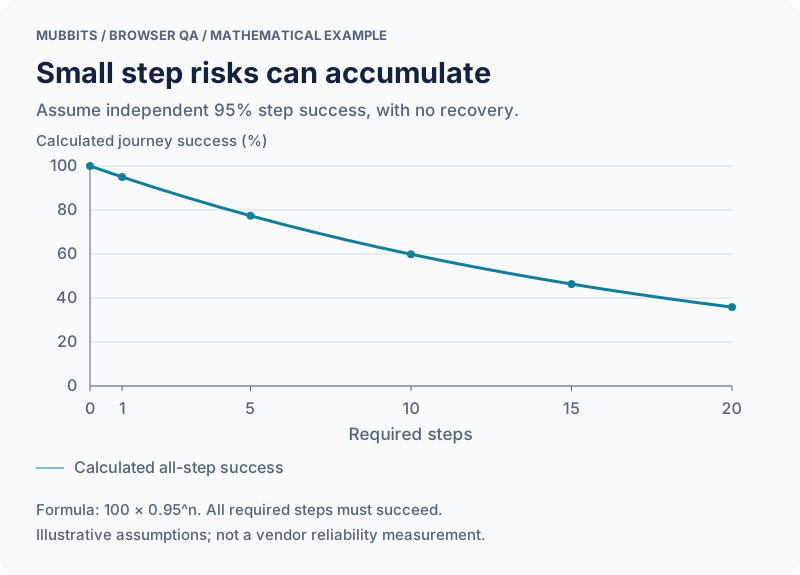
The graph below is a deliberately simplified mathematical example. Assume every required step succeeds independently with probability 95%, and the journey succeeds only when all steps succeed. Under those assumptions, a journey of n steps has probability 0.95 to the power n.
That gives approximately 95.0% for one step, 77.4% for five, 59.9% for ten, and 35.8% for twenty. These are calculated values, not measurements of Claude, Codex, Playwright, or any production product. Real errors can be dependent, and agents may recover or retry, so actual reliability can differ substantially.
The illustration explains why a long sequence deserves more than a final success message. Check meaningful states during the run: the intended account is active, the correct object is open, the selected time is visible, and the final persisted value matches. A checkpoint should observe progress without granting permission to bypass a failure.
Use recovery rules that reflect the operation. Repeating a harmless search is different from repeating a payment or creating a booking. Before retrying a write after an ambiguous response, inspect whether it already completed. Otherwise an attempt to make the test robust can introduce duplicate actions.
| Required steps | Calculated journey success |
|---|---|
| 1 | 95.0% |
| 5 | 77.4% |
| 10 | 59.9% |
| 20 | 35.8% |
A simplified model of multi-step journey success
Capture evidence that makes a failure reproducible
A useful bug report includes the build, browser environment, fixture, account role, steps, expected result, actual result, and relevant artifacts. Record the smallest sequence that still reproduces the problem. A long agent transcript may contain that information, but it should not be the only way another engineer can find it.
Playwright's Trace Viewer documents inspection of recorded actions, page snapshots, and debugging information after a run. Traces can make it easier to understand a failure than a single final screenshot. When using an agent-controlled browser, capture comparable evidence through the integration's supported facilities.
Handle artifacts as test data. Screenshots, traces, network details, and storage snapshots can contain tokens or personal information. Use sanitized fixtures and an appropriate retention policy. Keep the evidence available to the people investigating the defect without publishing unnecessary account data.
For a visual defect, include the viewport and the relevant moment. For a state defect, include the independently observed record. For a timing defect, record what was awaited and what actually happened. These details help an engineer distinguish a race condition from an agent clicking before the interface was ready.
Playwright: recorded traces, snapshots, and action inspection
Which user journey needs a closer look?
Share the flow, target users, and test environment. We can help combine browser exploration with dependable checks of the actual outcome.
Convert confirmed discoveries into stable regression checks
Once a defect is understood, write a check against the behavior that failed. An agent may have discovered a booking bug through an unusual navigation path, but the durable regression should assert the relevant scheduling rule and persisted outcome. Keep the exploratory transcript as supporting context.
Use semantic element identification when writing browser tests: roles, accessible names, or stable test identifiers appropriate to the application. Pixel coordinates can be useful for interactive exploration, but a regression tied to one screenshot's layout is vulnerable to ordinary visual changes.
Avoid encoding every incidental action the agent took. A test that requires an exact series of harmless clicks can fail when the interface improves, even though the business outcome remains correct. Enforce the essential path and state, and keep separate tests for the accessibility or interaction details that matter.
Run the check on the build that will ship. Development-server behavior can differ from the deployed application because of routing, caching, headers, or asset paths. For static sites, verify navigation through the hosting setup as well as the application code.
Give browser agents a controlled operating boundary
Set the allowed domains, accounts, and actions at the execution layer wherever possible. Browser content is input to the test, not authority to expand its mission. A page that asks the agent to upload credentials or visit an unrelated site should not redefine the run.
Separate exploration from privileged maintenance. The same test account should not be able to edit production infrastructure merely because a flow encountered an error. Keep credentials short-lived where practical and make the test environment identifiable to the person watching the run.
Define stopping conditions for repeated failures and unexpected writes. Save the evidence before cleanup so the team can understand what happened. A test that repeatedly restarts until it reports success can hide an intermittent product defect.
Use server-side assertions to check account and tenant boundaries. A browser journey may look correct while reading the wrong organization's data. Interface testing and access-control testing should inform each other, while retaining explicit checks for each property.
Evaluate the testing process before expanding it
Pilot the workflow on a few journeys with known success and failure cases. Count valid bug reports, incorrect reports, reproducibility, investigation time, and cost per completed run. Keep environment failures separate so they do not distort the product-quality picture.
Inspect successful runs as well as failures. An agent may reach the intended screen after unnecessary actions or leave unwanted records behind. Confirm cleanup and check that the evidence actually supports the conclusion.
Scale the categories that produce useful discoveries. Stable regression cases should remain cheap and repeatable; exploratory missions can run around releases, new interfaces, or user-reported problems. Avoid using a costly open-ended browser session to replace a simple assertion that already answers the question.
The strongest outcome is a feedback loop: an agent finds an unfamiliar problem, an engineer verifies it, and the repository gains a durable check. That makes browser agents a practical addition to quality work without turning a polished completion message into a release gate.
Frequently asked questions
Will computer-use agents replace Playwright tests?
They serve different purposes. Agents can explore unfamiliar interfaces and investigate failures, while deterministic tests provide repeatable checks for known behavior. Confirmed agent discoveries should often become stable regression cases.
How do we verify a browser agent's success claim?
Check both the interface and the independently observed application state. Record the tested build, fixture, account role, and evidence. A success message alone is insufficient for a consequential write.
Does the 95% graph describe a real agent's reliability?
No. It is a calculation under explicit assumptions of independent steps, equal 95% step success, and no recovery. It illustrates compounding failure risk and should not be used as a vendor benchmark.
Let’s work through your next step.
Tell us what you’re building, what you’ve tried, and where you need a hand. We’ll work with you to define a practical way forward.