

OpenAI's September 2026 GPT-6.1 Sol release puts a practical question in front of AI product teams: can more demanding work fit inside the budget and response time of an everyday feature? The launch matters most when a model is part of a repeated workflow, rather than an occasional impressive demo.
This article summarizes the current official documentation, then walks through an original cost example and a focused adoption plan. Specifications and rates were checked on September 30, 2026. The example workload is hypothetical, and the recommendations are our analysis; we have not benchmarked your application or measured a MUBBITS client deployment against this release.
Key takeaways
- OpenAI positions GPT-6.1 Sol for complex coding, computer use and professional work at a lower cost than GPT-6 Astra.
- The API model identifier is gpt-6.1-sol. Check reasoning settings and tool-calling compatibility before changing an existing integration.
- Compare cost per accepted task, including retries, tools and human review, rather than choosing a model from token prices alone.
- Start with one representative workflow and a measured rollout. A launch announcement cannot establish your application's quality or latency.
What the GPT-6.1 Sol launch changes
OpenAI's current GPT-6 guide describes GPT-6.1 Sol as an option for complex coding, computer use and professional work with performance approaching Astra at a lower cost. The guide also recommends comparing models on your own tasks. That positioning is a useful reason to evaluate Sol; it is not a substitute for evidence from your product.
For a founder, the interesting opportunity is to move beyond a feature that only writes a plausible reply. A product might need to read several documents, reconcile details and prepare a structured draft that a person can use. If a candidate model handles that work with fewer corrections, the feature may become easier to operate.
For an engineering team, a release creates a compatibility and measurement task. You need to understand what changes in the API, reproduce the intended workload and decide whether the new behavior is an improvement. Treat the model as one component of the system alongside retrieval, permissions, tools and interface design.
The specifications that affect an integration
The official model page lists gpt-6.1-sol with a 1,050,000-token context window and up to 128,000 output tokens. It supports reasoning efforts low, medium, high, xhigh and max; medium is the default, while none and minimal are unsupported. Tool calling requires the Responses API.
These details have different product implications. A large context window gives you room to supply relevant material, but does not make every document relevant. An output limit is a ceiling, not a recommendation to produce long answers. A reasoning setting is a control to evaluate, rather than a promise about a particular response time.
Before a model switch, inspect the real request path. An older integration may send a reasoning value the new model does not accept or rely on tools through a different endpoint. Exercise the smallest request first, then a request with the actual tools and output format your feature uses.
Keep configuration visible. Record the model, effective reasoning setting, prompt version and tool definitions with each evaluation run. Without that record, you can mistake a configuration change for a model improvement or regression.
Price one realistic request before estimating the month
As checked on September 30, the model page lists standard text-token rates of $2 per million input tokens, $0.10 per million cached input tokens and $10 per million output tokens. Those are model rates, not a complete application quote. Other processing modes and tool charges need their own accounting.
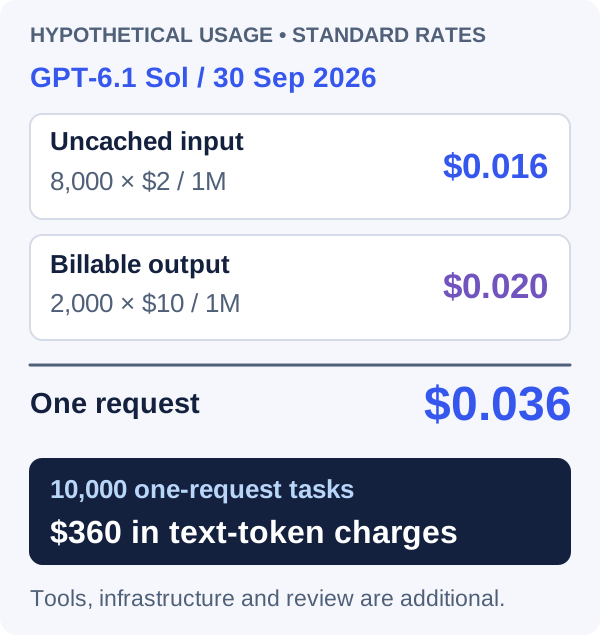
Consider an invented request that uses 8,000 uncached input tokens and 2,000 billable output tokens. Input costs 8,000 divided by one million, multiplied by $2: $0.016. Output costs 2,000 divided by one million, multiplied by $10: $0.020. The combined text-token charge is $0.036 for that request.
If 10,000 tasks each used exactly one such request, the hypothetical monthly text-token cost would be $360. If each task averaged 1.3 requests at the same size, that component would become $468. Real attempts can have different lengths, so production accounting should sum actual usage rather than assume every retry is identical.
This estimate excludes tools, storage, retrieval, hosting, applicable cache creation charges and staff review. It also does not predict the model's actual output length on your work. Use billed usage records, including any billed reasoning tokens, to replace the planning inputs once you have a pilot.
Avoid assuming that all repeated input qualifies for the cached rate. Verify what your requests actually reuse and what the provider reports as cached. A conservative first estimate with uncached input is easier to defend than a budget built on an unmeasured cache-hit assumption.
| Component | Illustrative usage | Calculated charge |
|---|---|---|
| Uncached input | 8,000 tokens at $2 per million | $0.016 |
| Billable output | 2,000 tokens at $10 per million | $0.020 |
| One request | Input plus output, without other charges | $0.036 |
| 10,000 one-request tasks | Same invented usage for every task | $360 |
| 10,000 tasks at 1.3 requests each | Same invented usage for every request | $468 |
OpenAI Docs: GPT-6.1 Sol pricing
Put usage beside the price
Choose a workflow with an observable outcome
Start where success can be checked independently. For an illustrative purchase-order assistant, the job might be to extract the vendor, line items and total, compare them with a permitted catalog and prepare a draft for review. The person reviewing it should be able to trace each important value to a supplied source.
Define what the model is allowed to decide. It can identify a missing field, explain a mismatch or prepare a draft. Whether it may create a live order is a separate product decision. A better model does not resolve an unclear boundary between assistance and execution.
Use a small collection of representative inputs: a straightforward order, an ambiguous product name, a missing quantity and a document with contradictory totals. Include examples your existing workflow handles badly. Compare accepted output, correction effort and the ability to communicate uncertainty.
Write acceptance rules before examining the candidate's answers. For this example, the draft must preserve the supplied quantities, flag inconsistent totals and avoid inventing a product match. Those rules give reviewers a basis for agreement beyond whether an answer sounds polished.
Evaluating a new model for an AI feature?
Share the workflow, current integration and acceptance criteria. We can help scope a practical evaluation and rollout.
Evaluate Sol against the system you already operate
Keep the same inputs, access, tools and acceptance rules for the first comparison. Record the current model's outcome as well as Sol's. Do not quietly give the candidate a cleaner prompt or extra documents and attribute the entire improvement to the model.
Measure the things users experience: task completion, time to a usable result, correction effort and how often the workflow needs a retry. For an interactive product, waiting for a finished draft may matter more than how quickly the first token appears. For background work, predictable completion and exception handling may matter more than a streaming response.
Once you have a baseline, tune one variable at a time. You could test a different reasoning setting, shorten irrelevant context or improve the tool contract. Record those runs separately. The best production configuration may differ from the fairest model-only comparison.
Repeat uncertain cases. A single clean result can hide inconsistent behavior, while one failure may come from a transient tool problem. Inspect the trace and classify the cause before deciding whether a model switch is warranted.
Design a bounded model comparison
Use with a sanitized description of an existing AI feature.
Help design an evaluation of gpt-6.1-sol for [workflow]. Current behavior: [details]. Users accept a result when [criteria]. Existing model and settings: [configuration]. Tools and permitted data: [details].

Propose representative inputs, independent outcome checks and a recording sheet for completion, correction effort, total latency and actual billed usage. Include ambiguous and failed-tool cases. Keep the baseline and candidate inputs comparable.

Label assumptions. Do not invent benchmark results or estimate a savings percentage without measured usage and accepted outcomes.
Protect the tool boundary as capability improves
If the assistant can act through tools, enforce access in the service that owns the data. A draft should not gain the ability to read another customer's records simply because the model proposes a lookup. Keep tool inputs constrained to the operations the feature actually needs.
Separate preparing a change from committing it when the workflow calls for review. A purchase-order assistant can return a draft identifier and validation notes; the application can let an authorized person inspect and submit that draft. This gives the interface a clear state to display and the backend a clear authorization point.
Design retries around the actual operation. Repeating a read is different from repeating an order creation. Use your existing duplicate-prevention and reconciliation mechanisms for writes, and verify that a timeout cannot turn one user action into two records.
Also keep evidence useful for support. Store permitted diagnostic information such as configuration, outcome status and tool error categories. Avoid collecting every raw document merely because it might be useful someday. Decide what staff need to diagnose a failure and retain that information deliberately.
Roll out the improvement where it has evidence
Begin with a limited, identifiable cohort or an internal workflow. Give the release an owner and define what would trigger a pause: more incorrect drafts, unacceptable delays or failed tool actions. Keep the previously working configuration available so the team can recover without rewriting the feature.
Review the exceptions during the pilot. An average can look good while one document type consistently fails. Decide whether to improve that path, route it differently or leave it with the existing process. Broad adoption is easier when you know the boundaries of the improvement.
Expose accurate states to users. If the assistant is still processing, waiting on a service or unable to complete a task, say so. Do not let a friendly completion message outrun the saved state of the application.
Finally, compare the total operating effort. If model charges fall but staff spend longer fixing drafts, the business outcome may be worse. If slightly higher model spending reduces repeated work and produces accepted results, that can be a sensible trade. The right decision depends on the whole workflow.
What to check before choosing a plan or mode
OpenAI's release notes point to GPT-6.1 Sol for repeated work across code, apps and documents, while noting that access depends on the plan, client and workspace settings. Check the product your team actually uses rather than assuming that an API model page establishes access in every interface.
Keep API budgeting separate from subscription budgeting. A per-token estimate describes one form of consumption. An employee using a workspace product may instead be subject to that product's allowance and administrative controls. Have the person who manages the workspace confirm access and limits before making a purchasing decision.
For the product feature itself, keep the adoption decision narrow: does this configuration meet the quality, time and cost requirements for this workflow? That question remains useful after launch week, when the next model announcement arrives.
Frequently asked questions
What model identifier should developers check?
The current official API identifier is gpt-6.1-sol. The model page and GPT-6 guide describe supported reasoning settings and tool-calling requirements. Validate those against your existing request configuration before switching.
Is GPT-6.1 Sol always the cheapest choice?
That depends on the task, configuration, usage and accepted results. Compare the total cost of completing the workflow, including retries and review. A lower rate or a vendor performance claim cannot determine that result for your application.
Does the illustrative $360 estimate include the entire application?
No. It covers only 10,000 identical, hypothetical requests with 8,000 uncached input tokens and 2,000 billable output tokens at the listed standard rates. Tools, infrastructure, additional requests, cache creation where applicable and staff time are separate.
Let’s work through your next step.
Tell us what you’re building, what you’ve tried, and where you need a hand. We’ll work with you to define a practical way forward.