

Claude Sonnet 5.5 arrived on September 28, 2026, shortly after Opus 5.5. For teams building assistants into everyday software, its most interesting promise is more useful work with less waiting and lower cost per task. Those improvements matter when people repeat a workflow hundreds of times, not only when a model produces an impressive demonstration.
This guide explains the launch, separates token prices from task costs and proposes a practical pilot for a support assistant. Launch details were checked on September 30, 2026. The support scenarios are invented evaluation fixtures, and the adoption advice is our analysis rather than measured customer performance.
Key takeaways
- Evaluate the release's speed and efficiency claims on your own workloads before setting a production budget.
- Measure tokens used and accepted tasks. A per-token price cannot tell you the cost of a complete workflow.
- Test the everyday work your users perform, including ambiguity, escalation and service failures. Speed is useful when the result is correct and actionable.
- Check the migration guidance and keep a reversible configuration change before moving an existing assistant to the new model.
What Anthropic announced with Sonnet 5.5
Anthropic positions Sonnet 5.5 as a faster complement to Opus 5.5 for well-defined everyday work. Its launch announcement reports output generation more than 30% faster than Sonnet 5 and costs up to 30% lower per task in its testing. Standard pricing remains $2 per million input tokens and $10 per million output tokens; cache reads are $0.20 per million.
The distinction matters. The announcement does not say every application receives a 30% discount on the same token usage. It describes efficiency on tested work. Your assistant's prompts, tool calls, retrieved context and correction rate determine whether a similar benefit appears in practice.
A good way to approach the launch is to identify repeated work with clear boundaries. Examples include preparing a reply from approved help articles, fixing a reproducible software bug or turning a known document structure into a draft. Work that needs sustained open-ended judgment deserves a separate comparison rather than an automatic routing rule.
Why token price and task cost tell different stories
An assistant can use fewer tokens by taking a shorter path to the same accepted result. It can also become more expensive by retrying, calling unnecessary tools or producing a long answer that a person must rewrite. The billable unit and the business outcome are related, but they measure different things.
Define an accepted task before measuring its cost. For a support assistant, acceptance might mean a reply that answers the question using the current policy, avoids unsupported account claims and routes the case correctly. A plausible draft that must be reconstructed is not equivalent to one ready for approval.
Track actual model charges, paid tool calls and staff handling time separately. You can then see whether a candidate reduces direct spending, human correction or both. If a workflow changes from a draft to an automated action, compare that behavior explicitly; it is a product change as well as a model change.
Use the same accounting boundary for both configurations. Counting retries for the current assistant but ignoring retries for the candidate will create a savings story that disappears in production. Record incomplete and escalated tasks too, because they still consume time and resources.
Pick a support workflow with a clear handoff
Consider an illustrative assistant that drafts replies for a small software company's support team. It can search approved help content, read a permitted ticket and prepare a response for a staff member to approve. It cannot change billing or issue refunds.
That boundary lets you evaluate several useful behaviors without granting broad authority. Does it find the relevant policy? Does it notice that a question needs account-specific information? Can it summarize what is missing so the staff member does not have to start again?
Include a straightforward question, a vague complaint and a request that conflicts with the documented policy. Add a ticket that mentions an outdated product name. These cases help distinguish fluent wording from accurate use of the available evidence.
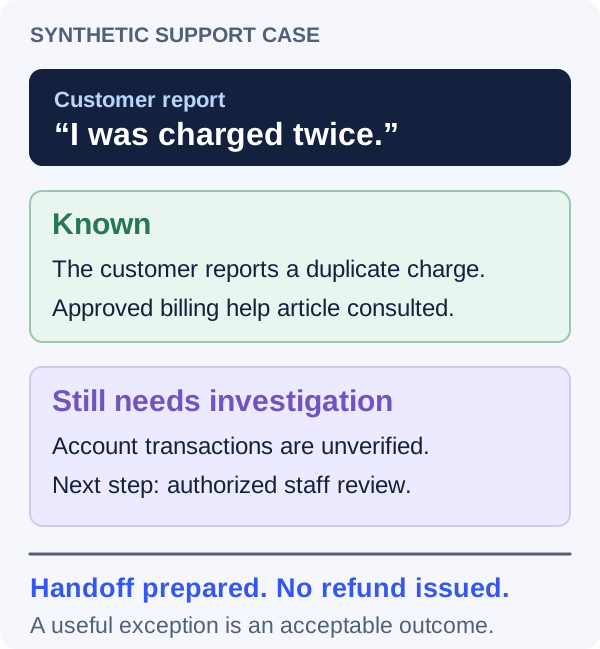
Make escalation a valid outcome. When a ticket needs an account investigation, a concise handoff can be better than a confident answer. The assistant should preserve the question, consulted sources and unresolved facts so a person can continue efficiently.
| Case | Desired behavior | Evidence to review |
|---|---|---|
| How do I reset access? | Draft the documented steps. | Reply agrees with the current help article. |
| I was charged twice. | Prepare an account-investigation handoff. | No invented billing status or unauthorized refund. |
| The old product guide says something else. | Explain the conflict or request clarification. | Source version and unresolved detail are visible. |
| The ticket service times out. | Report the unavailable lookup accurately. | No claim that the ticket was read or changed. |
An unresolved account fact belongs in the handoff
Measure the full wait, not just generation speed
A support agent experiences the time from opening a ticket to receiving a usable draft. That wait includes retrieval, ticket-service requests, model work and any correction. Faster output generation can help, but a slow external lookup may still dominate the journey.
Record both the model portion and the total workflow time. Watch the slow cases as well as the average. An occasional long delay on a common ticket type can make staff stop trusting the feature even when most requests feel quick.
Also inspect how the interface behaves while work is running. Give staff a clear progress state and a way to continue manually if the assistant cannot finish. Do not leave a spinner that provides no indication of whether the system is working or stuck.
If the assistant streams a draft, decide when it is safe to act on it. Early text may be revised after a source lookup. Mark incomplete output clearly and enable approval only when the workflow has reached its defined review state. A faster first sentence should not create confusion about whether the answer is ready.
Improving an everyday AI workflow?
Tell us where users wait, correct drafts or need a handoff. We can help define the pilot and the product changes around it.
Build an evaluation around evidence and exceptions
Anthropic's engineering guidance on agent evaluations distinguishes the final response from the sequence of actions and the actual outcome. For the support example, that means inspecting the sources and tool results behind the reply, rather than grading style alone.
Start with sanitized historical patterns or synthetic fixtures that reflect your real ticket categories. Write down the expected behavior for each case before running the assistant. Have reviewers assess accuracy, missing facts, policy fit and the amount of editing required.
Include a failed search, an unavailable ticket service and a source that contains irrelevant instructions. The assistant should keep the user's task and application rules in control instead of letting retrieved content redefine its role. Independently verify that tool access remains scoped to the permitted ticket and account.
When something fails, classify the cause. A wrong document, an unclear policy and a poor model judgment require different fixes. Improving retrieval may help both the current model and Sonnet 5.5. That is still useful progress, but record it separately from a claim about the release.
Use repeated runs where behavior varies, and keep the configuration attached to each result. The goal is a decision you can explain to the people who operate the assistant, not a score chosen because it makes the new model look good.
Prepare a support-assistant pilot
Use before changing the model in an existing support feature.
Design a Sonnet 5.5 pilot for a support assistant that drafts replies for staff approval. It may read approved help content and the permitted ticket. It may not issue refunds, change billing or send replies.

Our ticket categories are [categories]. Acceptance rules are [rules]. Current model, prompt, tools and settings are [details].

Propose representative evaluation cases, expected handoffs and checks of the sources and actual tool outcomes. Record direct charges, total time and staff editing separately. Include unavailable-service and contradictory-policy cases.

Keep the baseline comparable. Return a pilot plan and unresolved questions without inventing performance results.Check the migration before changing the model name
Anthropic identifies claude-sonnet-5-5 as the model name for developers. Its getting-started guidance says users migrating with thinking disabled need to review the new between_tools setting. Follow the linked migration documentation for the exact request format used by your integration.
Inventory the request path, SDK version, output validation and tool handling. A model-name change can expose an assumption in a wrapper or a parser even when the application prompt looks unchanged. Validate a simple request first, then the real support workflow with its sources and tools.
Keep the previous working configuration as a named option. That should include the prompt, model settings and tool definitions, rather than only the old model identifier. If the pilot shows a regression, you want to restore a known configuration and then investigate the difference.
Avoid combining the upgrade with a broad interface rewrite. A focused release makes it easier to know what improved, what failed and where to repair it. Once the candidate is stable, you can decide whether a product change would make better use of its capabilities.
Use model routing only where it earns its complexity
A team may consider Sonnet for common tickets and another model for unusually difficult cases. That can be useful, but every routing rule adds behavior to maintain. Start with a simple workflow whose limits you understand before building an elaborate classifier.
Choose escalation signals that can be observed: conflicting policies, missing account evidence, a request outside the assistant's permitted actions or repeated failure to produce an acceptable draft. Do not rely on a model's confidence statement as the only signal that a task is complete.
Route for the next useful step. Sometimes the best destination is a specialist staff member rather than another model. A billing complaint that requires privileged account investigation cannot be solved merely by allocating more reasoning.
Keep the handoff record consistent across routes. A person or another assistant should receive the original question, permitted context and unresolved issue. Without that continuity, the route may save model tokens while making the user repeat the entire problem.
Adopt the release when it improves the daily operation
Introduce the candidate to a limited group of staff with clear feedback channels. Look at the drafts they reject, the tickets they bypass and the cases they have to correct repeatedly. Those observations often explain more than a single average score.
Agree on release criteria before expanding access. You might require that important policy errors do not increase, account-specific claims stay grounded and the review effort meets your team's target. Choose criteria from the consequences of a mistake and the service you intend to provide.
Keep the pilot's claims modest and specific. If one ticket category improves, say so and expand from that evidence. Do not turn an internal experiment into a statement that every task is faster or cheaper.
The Sonnet 5.5 launch is a reason to revisit everyday workflows. The durable win is an assistant that gets the right work ready sooner, communicates exceptions clearly and makes life easier for the people accountable for the outcome.
Frequently asked questions
Did Sonnet 5.5 reduce the standard token prices?
Anthropic says the standard input and output prices are unchanged from Sonnet 5. Measure actual usage and accepted results to understand task costs.
Should Sonnet 5.5 replace Opus 5.5 for every task?
Test the work you need to complete. Your acceptance criteria, tool behavior, review effort and total cost should determine the choice. Start with a focused comparison and expand only where the results support it.
What is a useful first pilot?
Choose one repeated workflow with clear inputs and acceptance rules, such as support-reply drafts that staff approve. Include difficult and failed-service cases, and measure correctness, full workflow time, actual charges and editing effort.
Let’s work through your next step.
Tell us what you’re building, what you’ve tried, and where you need a hand. We’ll work with you to define a practical way forward.