

On-device AI runs a model on a user's phone or computer rather than sending every inference request to a remote model service. In 2026, Apple's Foundation Models ecosystem and Google's ML Kit GenAI APIs make this a practical option for some mobile features. For US product teams, the decision comes down to task quality, supported devices, data handling, and the experience when local inference is unavailable.
A useful app might turn a technician's short notes into an editable visit summary while offline. That is a narrower requirement than asking a phone to answer any question about the business. This guide explains how to choose a local, cloud, or hybrid implementation. Sources were checked October 2, 2026; product scenarios and release criteria are illustrative engineering recommendations.
Key takeaways
- Select one bounded task before choosing an on-device model.
- Foundation Models can connect to local and server models; the framework name alone does not establish a local data boundary.
- Device, model, language, and runtime availability need testing alongside answer quality.
- A cloud fallback changes the data flow and should be clear to the person using it.
What is new in mobile AI during 2026?
Apple's WWDC26 Foundation Models session described an updated on-device model, vision capabilities, Private Cloud Compute access, and a LanguageModel abstraction for local and server providers. These are distinct execution paths. Check the specific SDK, operating system, entitlement, and availability requirements for the feature you plan to ship.
Google's ML Kit GenAI overview, updated September 28, 2026 when checked, documents Gemini Nano features through AICore. It lists summarization, proofreading, rewriting, image description, speech recognition, and a Prompt API. It also separates device support across API groups and notes that different Nano versions can produce different results.
For a product roadmap, the useful change is more choice about where intelligence runs. The right architecture still depends on which devices customers use and what the feature must do, rather than which platform announcement sounds most capable.
Choose between on-device, cloud, and hybrid AI
Local inference is worth evaluating when a feature uses a small amount of user-provided content and should continue without a reliable connection. A remote model can be useful when the task needs capabilities unavailable on the device or current business data held on a server. A hybrid design assigns those responsibilities explicitly.
Do not assume local means faster for every task. Measure the full experience on supported hardware, including first-use preparation and contention with the rest of the app. Similarly, a cloud request includes network and backend time, not just the model's generation speed.
Use a task comparison rather than a universal winner. The table below is an architecture worksheet, not a benchmark or a statement that every platform provides the same functionality.
| Need | Candidate approach | Evidence to collect |
|---|---|---|
| Edit a short local draft | On-device inference | Meaning preserved; works on target devices |
| Answer from current account records | Authenticated backend, optionally with a model | Permissions and fresh source data |
| Handle an unsupported local task | Optional cloud path or manual workflow | Clear data disclosure and useful fallback |
| Serve a varied device fleet | Capability detection and equivalent core workflow | Usable experience without local AI |
Define one useful feature and its failure conditions
Consider an illustrative field service app used by a US maintenance company. Technicians enter notes after a visit. The feature proposes a clearer summary using only those notes, and the technician approves the result before it reaches the customer. It must preserve dates, measurements, unresolved issues, and negation such as 'did not replace the filter.'
Create examples with shorthand, spelling mistakes, ambiguous pronouns, and missing information. Include notes whose safest summary says that a detail is unknown. An app that quietly turns 'check next visit' into 'checked today' has failed even if the paragraph reads well.
Keep the original text accessible and make editing straightforward. The generated draft should not replace the source or trigger a customer message automatically. This makes the usefulness test concrete: can the technician complete the same record accurately with less effort?
Which AI task belongs in your mobile app?
Bring a real user task and your target devices. We can evaluate local inference, native integration, data boundaries, and a fallback that keeps the workflow useful.
Make availability part of the product experience
Check support at runtime rather than inferring it from the device brand. Apple's SystemLanguageModel exposes availability states. On Android, Google's documentation distinguishes API support, model versions, quotas, and foreground execution constraints. Your app needs deliberate behavior when a supported feature cannot run at that moment.
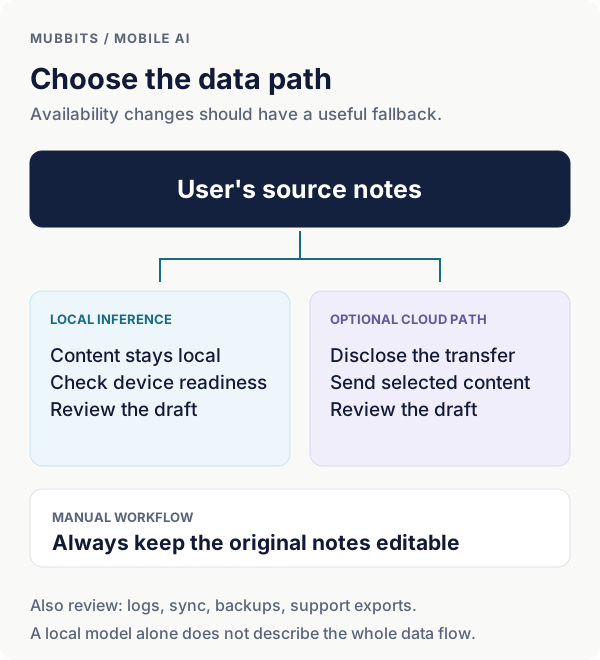
Offer a manual summary workflow on unsupported devices. If model preparation is required, explain what is happening and let the person continue the visit record. Bound retries and allow cancellation; repeated automatic requests can turn a temporary limitation into a poor experience.
Test interrupted generation, switching apps, missing connectivity, and changing device settings. Include the oldest supported hardware in the device matrix. For a React Native or Flutter product, prototype the native integration early rather than assuming a platform SDK is immediately exposed by your current libraries.
Apple: SystemLanguageModel availability states
Draw the data boundary before adding cloud fallback
A local model call is one part of the data flow. Source notes may also appear in analytics events, crash reports, backups, account synchronization, and support exports. Inventory those paths before describing the feature as private. Avoid recording raw prompts and outputs in general telemetry when aggregate performance information will do.
If a local draft fails, a cloud fallback should be an explicit product decision. Show what content will be sent, why the remote path is needed, and what happens if the person declines. Do not automatically transmit the same private notes just because the on-device model is unavailable.
Apple's model abstraction allows both local and server implementations. That is useful for engineering, but it makes the execution choice especially important. Keep the provider selection and permitted data categories visible in configuration and review. Switching a model package can change the data boundary even when the surrounding interface looks identical.
Plan mobile app data and integration requirements
Make the execution path visible
Evaluate on real devices and price the complete feature
Measure draft quality, time to a usable result, user edits, failures, and the performance of the rest of the screen. Record device and model versions so an apparent improvement is not actually a change in hardware. Retest after operating system or model updates using the same approved examples.
Local inference can reduce remote model calls, but engineering, native integration, device testing, support, and any remote fallback still cost money. Estimate those responsibilities separately. A feature that saves API spend while excluding much of the customer fleet may be the wrong tradeoff.
For a US launch, test realistic American English notes, address formats, units, and the other languages your actual audience uses. Avoid guessing fleet coverage from national averages. Start from customer device data where available, minimize collection, and use a pilot to resolve the remaining uncertainty.
- Approved drafts preserve all task-critical facts and allow correction.
- The original workflow remains usable when AI is unavailable.
- Every cloud path follows the agreed data disclosure and access rules.
- Quality and device support remain observable after release.
Frequently asked questions
Is Apple's Foundation Models framework always on-device?
No. Apple's WWDC26 session describes local models, Private Cloud Compute, and third-party server model integrations. Review the specific model implementation and SDK requirements. A feature using the framework needs its own accurate explanation of where data is processed.
Can every Android phone run Gemini Nano features?
No. Google's documentation provides device support by API group and model version. Check current support and runtime readiness for the exact feature, then provide a useful manual or separately disclosed remote path for people whose devices cannot run it.
Can a React Native app use on-device AI?
Potentially, through an appropriate native module or integration. Prototype the required iOS and Android APIs with your build setup and target devices first. Cross-platform screens do not eliminate platform-specific availability checks, data handling, and release testing.
What is a sensible first on-device AI feature?
Choose a short, reviewable task using content already available on the device, such as drafting a summary or rewriting a message. Keep the source, allow edits, and define facts the output must preserve. Expand only after the task and device matrix pass evaluation.
Let’s work through your next step.
Tell us what you’re building, what you’ve tried, and where you need a hand. We’ll work with you to define a practical way forward.