

AI motion graphics and generative video solve different production problems. Code-based motion gives a team direct control over typography, product screens, and timing. Generative video creates moving imagery from prompts and visual references. For a SaaS product demo, the choice usually comes down to which parts must remain exact and which parts benefit from an imagined scene.
A hybrid film can use both: generated imagery to establish a setting, then a real product capture to prove the feature. This guide compares those choices, explains revision costs, and shows how to divide a short demo without inventing product behavior. Sources were checked on October 6, 2026. It complements our Opus 5.5 motion-graphics examples rather than repeating their prompts and storyboard.
Key takeaways
- Use real captures or controlled animation for exact interface behavior.
- Treat generated shots as creative assets that need inspection throughout the clip.
- Separate imagined context from evidence of a shipping feature.
- Choose a workflow by revision requirements, not only the appeal of its first output.
Why the distinction matters after the latest Claude examples
An October 2 Reddit launch-video post described a film built with HTML, GSAP, browser rendering, and synthesized sound. Although the creator used an AI assistant, the frames came from code. That is a different process from asking a video-generation model to invent a moving scene. The post also described several revisions and human playback checks.
Both approaches may be called AI video in casual discussion, which makes purchasing decisions confusing. A founder who needs a precise checkout demonstration may expect the same control from a cinematic generation tool that an engineer gets from editable layout code. A designer who needs believable environmental footage may be disappointed by a workflow centered on interface animation.
Describe the production method when reviewing examples. Ask whether the product screen is a real capture, an animated approved image, an interactive prototype, or generated pixels. That question is more informative than the name of the assistant that helped make the film. It also clarifies who can revise the result later.
Reddit, October 2: HTML/GSAP launch-video production and revision notes
What code-based motion lets you control
With code-based motion, the composition defines the position, scale, opacity, and timing of known objects. Text remains text, a logo remains an approved asset, and a screenshot remains the source image unless you deliberately transform it. This makes the method suitable for feature labels, pricing explanations, architecture diagrams, and interface walkthroughs.
A frame-based renderer can evaluate the composition at a particular moment. Remotion, for example, documents zero-indexed frame access through useCurrentFrame. That lets an engineer inspect a specific frame and adjust the controlling value. Reproducibility still depends on the rest of the environment, including loaded assets and fonts.
Control comes with implementation work. Responsive versions need intentional layout, transitions need design judgment, and an incorrectly animated interface can still misrepresent the product. Moving a screenshot around does not demonstrate that the underlying interaction exists. Use actual screen capture when the interaction itself is the evidence.
This approach is especially useful when a product team expects frequent changes. A price, date, or headline can live in configuration and be updated without regenerating unrelated imagery. The project must be organized well enough for the next person to find those controls.
What generative video adds, and what references do not prove
Generative video is useful when the scene itself needs to be created: an imagined workplace, an abstract transformation, or a visual metaphor that would be expensive to film. Google documents image-to-video input, reference images, and first/last-frame controls for supported Veo configurations. Feature availability varies by model, so check the current specification rather than assuming every endpoint accepts every control.
A reference image gives the generation process direction. It does not relieve the team of checking the result. Inspect the whole clip for changes to objects, text, proportions, and continuity. A convincing first frame can coexist with a distorted screen several seconds later.
For a software demo, keep generated imagery away from claims that depend on exact interface states. An imagined office can establish context; a generated billing page should not be the proof that a customer can export invoices. If a concept interface is necessary, label it as a concept and keep it separate from shipping functionality.
Account for practical delivery constraints such as clip length, resolution, access, and export availability. These are production requirements, not minor details to discover after creative approval. Save the final selected files and the generation settings so a later edit does not depend on a disappearing history entry.
Google: Veo generation inputs, references, and model-specific controls
Choose by the asset that must survive the edit
Start with the element that cannot change. If the film must preserve an exact product screen, use capture or controlled composition for that shot. If it needs a believable setting that does not make a factual product claim, a generated clip may be suitable. Many launch films contain both requirements.
The comparison below describes production characteristics, not measured quality scores. A skilled team can make strong work in either medium. The important question is whether the method supports the specific correction you are likely to request after review.
For example, changing a deadline from October 12 to October 19 should be a local edit in a typography scene. Asking a generation model to repair one date inside a moving scene may require regenerating pixels and then reviewing the rest of the shot again. That difference becomes significant when several stakeholders expect late copy changes.
| Requirement | Controlled motion / capture | Generative video |
|---|---|---|
| Exact product interaction | Use a real capture or a validated prototype. | Review carefully; invented pixels are not functional evidence. |
| Editable headline or date | Keep text in source and update its control. | Prefer adding exact text in a separate composition layer. |
| Imagined setting | Requires artwork, footage, or a designed scene. | Can create a new scene from prompts and supported references. |
| Local timing change | Adjust scene boundaries or keyframes. | May require trimming, retiming, or regenerating the clip. |
| Source handoff | Deliver project, assets, fonts, and render configuration. | Deliver chosen clips, settings, rights notes, and editing project. |
Which part of your product story needs to move?
Bring the product screens, audience, and required message. We can help choose a visual approach that preserves the product truth and supports future revisions.
A graph of a hybrid demo's production allocation
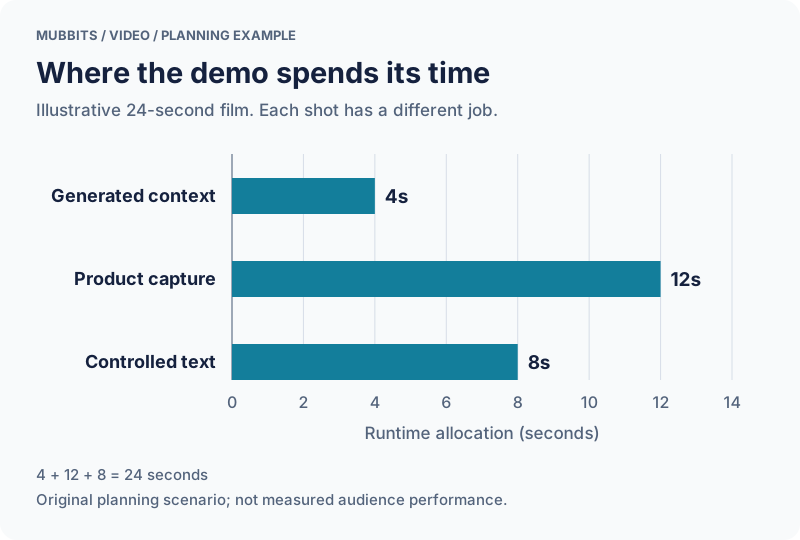
Consider an original illustrative 24-second demo for a field-service product. Four seconds establish the working context with a generated shot. Twelve seconds show a real product capture. Eight seconds explain the outcome and next step with controlled typography. The durations total 24 seconds; no section is a claim about optimal attention or expected conversion.
The graph shows the amount of runtime assigned to each production method. It is an allocation chart, not a comparison of tool quality. In this example, the largest share goes to the actual interface because that is where the feature is demonstrated. The generated setting supports the story without standing in for product evidence.
A hybrid edit needs a visual bridge. Match color, crop, and movement direction when cutting from the imagined setting to the real screen. Keep the screen readable rather than forcing it to inherit cinematic camera motion that makes the interface difficult to follow.
Put exact labels and the final call to action in the controlled composition. That keeps required wording editable and gives the team a predictable place to make late changes. If the generated clip is removed, the remaining film should still communicate the feature honestly.
| Production method | Seconds | Share of runtime |
|---|---|---|
| Generated context shot | 4 | 16.7%, rounded |
| Real product capture | 12 | 50.0% |
| Controlled typography | 8 | 33.3%, rounded |
A 24-second hybrid demo, by production method
Budget for accepted shots and likely revisions
Count usable assets rather than generations. A clip may look promising yet fail because an object changes shape or the framing cannot accommodate the required copy. Track why candidates were rejected; this helps distinguish an unsuitable method from a prompt that can be improved.
Estimate the entire path to approval: asset preparation, generation or implementation, render time, editing, review, and versions. Keep exploration separate from production. An open-ended search for visual direction can consume a budget that was intended for a finished deliverable.
Use a small representative shot before committing to a full film. Test the hardest requirement early, such as preserving a recognizable product object or making a dense screen readable in a vertical crop. If the approach fails that requirement, changing methods is cheaper than polishing the rest.
Prepare for late edits by placing volatile facts in editable layers. Dates, prices, availability notes, and legal copy should be easy to replace. Keep rights notes for external footage, generated media, fonts, and audio with the project. A film is only ready to publish when the team can use all of its assets in the intended channel.
Review a hybrid film with two kinds of evidence
Review factual and visual correctness separately. For the product portion, compare the shown behavior with the real application and approved copy. For generated shots, inspect continuity and unwanted changes throughout playback. For both, check readability, cropping, transitions, and sound at the intended viewing size.
Ask a reviewer to name what each shot proves. The generated opening may communicate a setting or mood; the capture should demonstrate an actual action and result. This keeps a cinematic presentation from quietly overstating the product's capabilities.
When requesting a revision, identify whether it affects the generated clip, the captured screen, or the composition around them. Preserve approved assets where possible. A change to the headline should not trigger regeneration of a background scene unless the layout actually requires it.
Deliver the editing project with the accepted clips, captures, source controls, and export settings. The team should be able to replace a screenshot or create a silent cut without reconstructing the original creative session. That handoff is often what determines whether the film remains useful after launch day.
See the earlier Opus 5.5 motion-graphics examples and prompts
Frequently asked questions
Are AI motion graphics the same as generated video?
No. An assistant can write animation code that renders known assets, while a video model generates moving imagery from inputs. A final edit can combine both methods, but their controls and revision paths differ.
Can we use generated video to demonstrate our app?
Use real captures or a validated prototype when the shot is evidence of exact app behavior. Generated scenes can provide context or illustrate a concept, provided they do not imply unverified functionality.
Which approach is easier to update after launch?
Controlled text and interface layers are usually more straightforward for precise copy or screenshot changes. Keep the full project and chosen media so updates do not depend on recreating an earlier generation.
Let’s work through your next step.
Tell us what you’re building, what you’ve tried, and where you need a hand. We’ll work with you to define a practical way forward.