

To invite a customer to TestFlight, give an external testing group a build, submit that build for beta review, then invite the customer by email or public link. The handoff is complete when someone outside your App Store Connect team can open the invitation on an iPhone, install the intended build and send useful feedback. Here’s how to get one person through that loop before inviting everyone else.
Key takeaways
- Start with a processed build that supports external testing and an internal group already in place.
- Use email for a named pilot. Use a public link when you want people to enrol themselves.
- Give testers one task and an expected result. Ask for the build number with every bug report.
1. Find the build your customer should receive
In App Store Connect, open Apps, select your app and open TestFlight. Under iOS, find the version and build number you intend to distribute. Write both down. Version 2.4 (318) and version 2.4 (319) can contain different fixes even though the version name looks identical.
If the build is still processing, wait for its status to change. Complete any export compliance questions shown for it. If the build is marked TestFlight Internal Only, upload a new build eligible for external testing. Adding more people to the existing group cannot change that build’s distribution setting.
Apple’s guidance on internal groups and internal-only builds
2. Create the customer group and submit its build
Apple requires an internal testing group before you can create an external one. Under Internal Testing, create a group if your app doesn’t have one. Then use the plus beside External Testing to create a group with a recognizable name, such as “Booking pilot”. Your customer can join that group without an App Store Connect role.
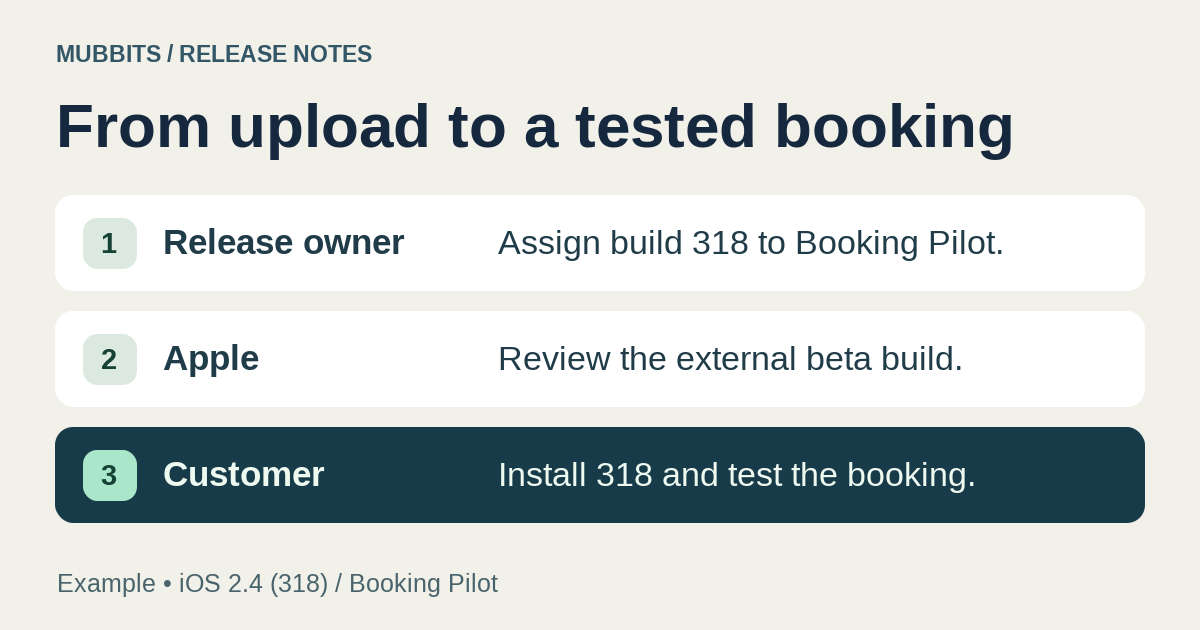
Open the external group, choose Add Builds and pick the version and build number you recorded. Enter the requested test information, feedback contact and review details. If sign-in is required, give App Review a working demo account and instructions for reaching the feature. Put those access details in the review fields. The What to Test text goes to your testers.
Submit the build for TestFlight App Review when prompted. Apple reviews the first external build and may review later builds. If you leave automatic notification off, return after approval and choose Notify Testers when you are ready.
Apple’s external group, beta review and notification steps
Who owns each step of the external beta?
3. Choose an invitation your tester can use
For a pilot with three named customers, open the external group, use the plus beside Testers and enter their email addresses. Start with one customer who can confirm that the invitation arrived. Ask them to install Apple’s TestFlight app on a compatible iPhone, open the invitation on that phone, accept, then tap Install.
For wider recruitment, enable a public link in the same group. Set a tester limit that your team can support and, if the test depends on specific hardware or software, set the device or OS criteria. Anyone with the link can share it. Turn it off when you have enough participants. For a named pilot, email makes it easier to follow up with the person who reported a problem.
Getting a beta into customers’ hands?
Bring the build, pilot group and feature you need tested. We can help your team prepare the release and turn feedback into a reproducible report.
4. Give the first tester a five-minute assignment
Imagine a booking app that used to lose an appointment when the phone went offline. The developer says build 318 fixes it. Asking “Does booking work?” could yield a thumbs-up from someone who never lost their connection. Give that tester a sample booking and a moment when they should disconnect.
Copy this into What to Test
Illustrative test for Booking Pilot 2.4 (318). Replace the example booking with your own test data.
Open the demo appointment for Thursday at 10:00. Switch on airplane mode, change the start to 10:30 and save. Close the app, reconnect and reopen the appointment.
Expected: the appointment shows 10:30 once, and the old 10:00 slot is gone.
If it differs: send feedback through TestFlight with the time you saw, your iPhone model, iOS version and the build number. Use the demo record in any screenshot.
5. Trace a missing invitation or a wrong build
Ask where the tester stopped. Someone who never received an email needs a different fix from someone who installed an old build. Reproduce the failure with a tester outside your development team before resending the same invitation.
| What the tester sees | What the release owner should check |
|---|---|
| No invitation email | Confirm the address and group. Check the build’s approval status and whether you need to notify testers manually. |
| Public link opens but enrolment fails | Check that the link is enabled, the group has room, the device meets its criteria and the group has a compatible build. |
| A tester reports an old bug | Ask for the installed version and build in TestFlight. Compare them with the build assigned to the group before investigating the code. |
| A previously working build expired | TestFlight builds are available for up to 90 days. Distribute a current build and ask the tester to update. |
Frequently asked questions
Do external testers need an App Store Connect account?
No. Invite them through an external TestFlight group. They accept on a compatible device in TestFlight. Reserve App Store Connect team access for people who need it for their work.
Does TestFlight approval publish my app in the App Store?
Beta approval makes the build eligible for external testing. A public App Store release has its own submission, review and release steps.
How do I know the pilot is ready for the rest of the group?
Ask one external tester to report the version and build they installed, the result of the assigned task and where they sent feedback. Check that your release owner can find that feedback and match it to the build.
Let’s work through your next step.
Tell us what you’re building, what you’ve tried, and where you need a hand. We’ll work with you to define a practical way forward.